this has been going on for some time now, and is one of the big reasons you don't see much artwork getting posted anymore by artists in community art forum and other places, which is a shame :/
any pic you post gets squashed to a maximum width of about 500 pixels, badly distorting pics 
anything can be done about this? 

or the photo preview in the gallery?
anything over about 500 pixels wide starts getting squashed
so it's kind of making art posting a bit naff, sigh
i cna understand the devs don't want say , porn spammers going nuts,
but, seems bit heavy handed
try this and see if it "squashes" for your browser display, will put in spoilers at it IS very large pic...if it shows at proper size
not really ;)
it's mid-way between the a cutlass and a khopesh...but as said, it's a DROW cutlass ;)
designed for up clsoe work in the dark, short but heavy blade to stab or slice..and poison! :p
this is a true Egyptian khopesh
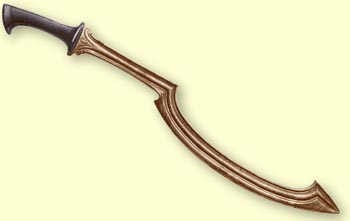
and if you use this link, you'll see my cutlass, but not squished by the forums, lol
www.silverblades-suitcase.com/rhino/2009...

And it's simple enough to post the pic with an embedded link to the original file. The posting window even gives you buttons that can automate all the code for you!
I don't see the problem. It's far better that posted images are shrunk to fit the forum width than to let them show up actual size and make it horrible to actually read the thread because everyone's post becomes three times the width of the browser window.
We had that problem a few times in the motivator threads on the psionics boards. The solution we used was to ask them to put the pic in an sblock.
However, as it stands the max width is less than the screens width. Increasing limit to the size of the screen wouldn't cause that problem.
as said...no point posting art even in a SPOILER block, if your work is so damn small it's no use ;)
so what's the point of spoiler tags when posting pics anyway...?
hence for artists, little desire to post here
amd makes most other uses of pics and spoiler tages moot :/
If you don't want your pics squished, don't post the pictures through your profile... I put everything on Imageshack and then link to it - if you click on the smaller version of my pics here on the forum, you go directly to the full-sized versions on Imageshack.
(And the main point of posting pics in spoiler tags is so that other people don't have to take the time to scroll past half a page of pictures if they don't want to.)