Wow. Very impressed with the overall quality of this product - even in its beta stage. I was just giddy when I saw my first printout...
...which is where I noticed a minor issue:
Example: Genasi Swordmage (Level 1) - Lightning Clash Encounter Power
*chose Bastard Sword as my feat and equipped/purchased one*
On the printed Powercard itself, under the -
"Your stats using Bastard Sword" there is no text. I am assuming because of the placement that there was simply no room to print the same text as it did with every other Weapon key word power.
(Example: Under other weapon keyword powers, I have the line that reads:
+7 attack bonus, 1d10+5 damage or something similiar)
If this is the case (being a space issue), perhaps have the text auto-scale if it seems to be running out of room on the card. No big deal for me to write in the damage (it is just 1[W] +INT mod), but an issue nonetheless.
In my viewer, the Portrait view ends at the Religion line in Skills. In Landscape view, it makes it to showing most of Thievery, but the word "Thievery" can't be seen (so, about the last 1/3 of the line is gone) plus anything below that. It prints as seen (without these lines).
On the power cards page, the words "ACTION" and "RANGE" have the bottom few pixels of cut off on the line. Looks like they are set to bottom of square and need to be reset to Centered.
First of all...
On the printed Powercard itself, under the -
"Your stats using Bastard Sword" there is no text. I am assuming because of the placement that there was simply no room to print the same text as it did with every other Weapon key word power.
(Example: Under other weapon keyword powers, I have the line that reads:
+7 attack bonus, 1d10+5 damage or something similiar)
If this is the case (being a space issue), perhaps have the text auto-scale if it seems to be running out of room on the card. No big deal for me to write in the damage (it is just 1[W] +INT mod), but an issue nonetheless.
After playing with the Character Sheet option "Hide Personalized Power Card Info" I noticed the same bug on my fighter's "Tide of Iron" power.
Other powers (like Passing Attack) seem to scale if I add/remove that data - so it seems to be a bug with the Tide of Iron power, and not just space being skipped because of a lack of scaling.
What power(s) do you see the error on?
The only one I noticed it on thus far is Lightning Clash. Hrm. You said you can add/remove data from the powercards? How? With the "Hide Personalized Power Card Info" setting?
EDIT: Even though it doesn't actually count (weapon damage in this case), it still lists the line "Your stats using Bastard Sword" under another power (Lightning Lure), and again lists nothing else underneath (in this particular case, the damage with or without my sword is the same, as it is a non-magical sword. Even if I was using it as an implement, there is no plus since it is a normal sword).
The only one I noticed it on thus far is Lightning Clash. Hrm. You said you can add/remove data from the powercards? How? With the "Hide Personalized Power Card Info" setting?
Yup. On the Character Sheet go to the OPTIONS menu - the last item in the list is "Hide (or Show) Personalized Power Card Info".
Yup. On the Character Sheet go to the OPTIONS menu - the last item in the list is "Hide (or Show) Personalized Power Card Info".
Darn. Tried that like you. No difference. This seems to be a bug. Odd one at that. I suppose that's what beta is for! I do hope this is something that will be looked into. All the wonderful automation is what makes this application so attractive!
The viewer/printing of the character sheet cuts off the last few lines on the first sheet, regardless of portrait/landscape. I can unlock the items, move some things around, and get the lines to display. However, the defaults probably should show every line without the need to do this.
In my viewer, the Portrait view ends at the Religion line in Skills. In Landscape view, it makes it to showing most of Thievery, but the word "Thievery" can't be seen (so, about the last 1/3 of the line is gone) plus anything below that. It prints as seen (without these lines).
On the power cards page, the words "ACTION" and "RANGE" have the bottom few pixels of cut off on the line. Looks like they are set to bottom of square and need to be reset to Centered.
Mine does the same thing, I move things around a bit and I can get all the skills to show up. I'm using Vista SP1.
Mine does the same thing, I move things around a bit and I can get all the skills to show up. I'm using Vista SP1.
Same thing here...using the default layout, the bottom of the skills gets cut off...actually there might be some of the right hand column also cut off. Vista SP1. Will try a totally different SP1 machine tomorrow with different printer drivers.
Alvo
I found that each page is printed off as a separate job, which is irritating when printing to PDF (it /could/ just be my print software, but that doesn't seem as likely).
Nope, happened to me too. BTW, if you want freeware software that will combine PDFs, I found this one: PDF Split and Merge Basic Version.
I have seen some sheets floating around that have the skills correctly listed, but mine are cut off as well at religion. How are people getting around this?
What I did as a quick fix is to go to OPTIONS --> UNLOCK PANELS, then I move the INITIATIVE panel over one column to the right (pushing down the DEFENSES panel), allowing the SKILLS panel to move up. Now, this ALSO pushes the LANGUAGES KNOWN panel right off the page, but I don't really need this one on the sheet at the moment, so off it goes!
Alvo
When Viewing character sheet in either landscape or portrait mode the bottom lines of the sheet are cut off. viewing in XP seems to be okay.
Something seems to mess up the font size. I don't know if it has anything to do with my printer driver, since that's the only thing both computers have in common.
I really can't believe that I am the only one with that problem. However, if I pick "Hide Personalized Power Card Info" the cards are displayed correctly.
It just seems that the algorithm which tries to scale the text to the box in the power card text freaks out if the font size would be to small and then picks a very huge font size.
I found that each page is printed off as a separate job, which is irritating when printing to PDF (it /could/ just be my print software, but that doesn't seem as likely).
I have a similar issue printing to a duplex printer, so I don't think it's your drivers. When I print on 'duplex' each page still comes out on a separate sheet; not a major glitch, but annoying.
I have a similar issue printing to a duplex printer, so I don't think it's your drivers. When I print on 'duplex' each page still comes out on a separate sheet; not a major glitch, but annoying.
It's been determined that the character sheet viewer sends each page as a separate print job.
This prevents Duplexing, makes PDF printing rough, and is annoying at my job where each print job gets its own cover sheet.

Other than that, I've been quite happy with the Character Builder. I've created about 30 characters so far, with very few problems. I just hadn't tried printing any of them until now - I wanted to see how nice the power cards would be if I printed them on card stock and cut them out. Oh, well.
I'm running WinXP, SP3, printing to an old HP Deskjet 820Cse.
OS Vista Home Premium
When Viewing character sheet in either landscape or portrait mode the bottom lines of the sheet are cut off. viewing in XP seems to be okay.
Same issue. In default portrait it cuts off skills right below Religion. Omitting Stealth, Streetwise, and Theivery.
Also Vista Home Premium. The rest of the sheets seem fine.
When printing to A4 the right hand side margin isnt large enough - it cuts off.
Hi,
When printing to A4 the right hand side margin isnt large enough - it cuts off.
I've got the exact same problem. Ive tried rearranging the sheets but it didn't help at all it still missed about 5mm of the right hand side off when printing.
When you select print click on the Preferences button to open the printing options and take note of the paper size of the document and the paper size that will be printed to.
If the document size is Letter and the paper size is A4 this will explain the 5mm cropping as Letter is about 5mm wider than A4.
You should be able to get around this by selecting an option to 'fit to page' or 'scaled printing'. The actual wording of the options will change from driver to driver but similar options should be available on all modern printers.
For me the document size shows as A4 and my paper size is set to A4 so I do not get any cropping on the right hand side of the page (XP and Vista). I do get cropping at the bottom of the page printing in Vista which is also visible in the CS Viewer. So I print from an PC with XP installed until this is resolved for Vista.
Also, the printout shifts one pixel through the center of the Max HP box and continues through the entire page.
This Pixel shifts back in line through the Resistances box. The effect looks like the section between the initial shift and the shift back is moved over one pixel.
Action and Range on the power cards is cut off, as mentioned above.
Also, the same thing appears to be happeneing on the power titles. so a letter 'g' for instance, would not have the lower part of the letter displaying.
I have modified my landscape orientation of the character sheet, and my skills list, placed on the left panel, cuts off almost half the skill number, making it difficult to read. I also placed the race/class features on the right side of the page, and they are having text cut off.
I noticed there is no "viewable printing" zone on the character sheet, and there are also no abilities to modify margins.
This is also in addition to issues I am having with power cards not displaying properly, as noted above.
Is anyone else having margin-related printing issues? I feel like this application is so very, very close to being awesome that these problems seem minor. But still, this is a beta, and so I think it's in everyone's best interest to try and bring up the issues I see.
Is anyone else having margin-related printing issues? I feel like this application is so very, very close to being awesome that these problems seem minor.
I am not having margin issues.
But, I certainly agree that this application great and is close to being a real gem.
I am still trying to feel out the character creation steps, but I have no suggestions yet. Well done thus far.
I am not having margin issues.
Gotta trip myself up on this one. I DO have margin issues when selecting the Print Power Cards in Landscape option. The left margin is cut-off a bit. My printer drivers are up to date.
Running Vista.
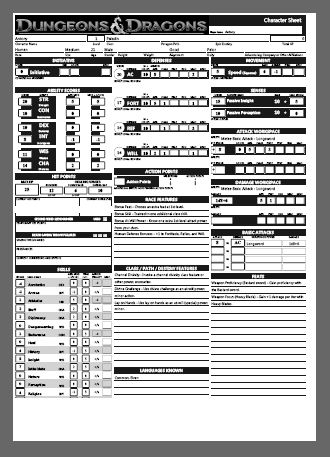
Lots of spare space on the bottom. And very tight margins.
When I use A3 (Twice the AREA of a4, ie sides are 1.414 times as long) I get the following:
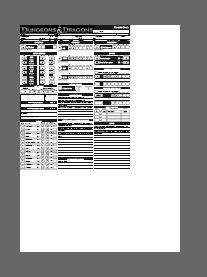
Would be cool to have a page setup / paper size / margins dialog.
Note: Screengrabs not to scale

Devs: If you want to mess around with different paper sizes, printing tp PDFs is good for testing.
Would be cool to have a page setup / paper size / margins dialog.
This.
I can't print the landscape version. Steps to reproduce the problem:
1) Layout->Default Landscape Layout
2) File->Print
3) Preferences (printer preferences)
4) Select Landscape Orientation
5) Print
Actual Result: It squeezes the landscape orientation page into a portrait orientation size. The long edge is compressed to fit along the short edge. E.g. The power cards are tall and skinny.
also
In portrait mode the power cards are printing slightly larger than in the prior beta (I think) and I can no longer fit the printed cards into card sleeves without cutting off some of the border on each side.
Thank you for the fine work on this product! You should make the code for this product open source with the class/race/skill/power database behind it closed. That way the larger community can contribute to bug fixes. Just make the licensing restrictive enough to protect your brand/trademarks/copyrights.
--
Robert Jenks
Anyone had problem of error during the print?
i can't print at all ç_ç
Mine says:
---------------------------
---------------------------
Before you can print, you need to select a printer.
If you need to install a printer, either double-click the Add Printer icon or click the Find Printer... button located on the General tab of this dialog.
---------------------------
OK
---------------------------
Of course, I have a printer installed, and I can print test pages, pages from notepad, etc. The printer is fine. If I click OK, I can select my printer (it is shown on the list of printers), but all the options are grayed out, an it won't let me print. If I right click on the printer and hit Print, it brings up that dialog box as above.
My printer is a HP Officejet J5780 All-in-One.
I'm running Vista 64-bit Ultimate SP1, with the latest HP Officejet J5700 Series drivers installed. It is connected through USB.
I have a custom layout on my sheet where I have the character portrait on both pages. Cause you know, the portrait is the most important part of the sheet. :D It's a custom portrait from a .bmp of a screenshot of my character from Neverwinter Nights.
On pages where the portrait appears the lines are not sharp and all the of the text is blurry, the the point where you can see the jagged edges of curves on the letters. But it only happens on pages where the portrait appears and only happens with my custom portrait. It doesn't happen if I select one of the stock portraits from the builder.
A very minor issue and probably doesn't deserve a lot of attention, but it DOES make a difference - I noticed I was squinting reading the sheet until I realized it was because the text and lines really WERE blurrier, it wasn't just fatigue or bad lighting or glare. I thought at first I needed to calibrate my printer (HP Color LaserJet 2600n) but it made no difference. I get enough of a headache after six hours of playing into the wee hours, no need to make it worse with a blurry character sheet!
Anyway, it's a MINOR issue, but there it is. No other problems with formatting for me, even with custom layouts like I use.
By the way, just wanted to give a helpful household hint: Did you know if you own Neverwinter Nights you already have a pretty cool character visualizer? Just fire up the DM client, create your toon, load up a module with a cool background, and outfit yourself with whatever equipment you like, then take a screenie! (You have to covert the file to .bmp or .jpg because I don't think CB will load .tga files)
So if I want to be a perfectionist I'd have to either scale the portrait down until it's at 305x278 or lower while preserving the aspect, and hope it doesn't have to be EXACTLY that resolution, or if it does need to be that resolution exactly, scale it down first until I get it close, then crop the image. Funny, it didn't do any of this stuff in the beta, and I was using the same huge .bmp image before.
Mine says:
---------------------------
---------------------------
Before you can print, you need to select a printer.
If you need to install a printer, either double-click the Add Printer icon or click the Find Printer... button located on the General tab of this dialog.
---------------------------
OK
---------------------------
Of course, I have a printer installed, and I can print test pages, pages from notepad, etc. The printer is fine. If I click OK, I can select my printer (it is shown on the list of printers), but all the options are grayed out, an it won't let me print. If I right click on the printer and hit Print, it brings up that dialog box as above.
My printer is a HP Officejet J5780 All-in-One.
I'm running Vista 64-bit Ultimate SP1, with the latest HP Officejet J5700 Series drivers installed. It is connected through USB.
obviulsy the printer is installed and work fine with any other program.
I've tried to print on a lan/printer and a pdf creator but none of them work. I don't have a printer directly connected to the pc and i can't have one
Seems to dislike printing anything except the default Portrait layout. Anything else gets stretched out and looks lousy.
Here too. No luck printing in landscape - page is distorted and compressed. I'd report a bug but...you can't.
Is there anyone who has had success with landscape? Can you tell us your system/printer details?
The staff member kindly directed me to report this as a bug--this is not possible of course since that feature does not seem to be in the release version.
1) Landscape mode is just plain broken. The image is scaled vertically by about 75%, causing the second row to be cut off. This happens regardless of the printer used.
2) In Portrait mode, the cards are too close to the edge. I recommend that you allow at least 1/2 inch border on all sides. Older printers like mine just can't handle much less.
I would like to see a way to have more control over the layout of the printouts, perhaps indicating how many rows and columns.
XP to HP printer. Image is elongated and pressed to far towards left hand side w/ lots of space at the right.
Please help.
I will say that we have indeed tested the character sheet printing in landscape mode, quite extensively. And it has worked flawlessly for us here so far. We're aware there are some edge case issues and if users will politely submit bug reports with details as to what they are doing and what is happening for them that is unexpected, we can better correct the issue in the next update. But if we can't reproduce the issue, there's little chance we can fix it. Make sense?
I call BS on this. I called WOTC customer service and asked them to print a landscape sheet. They immediately saw the problem. So far NO ONE has gotten this to work (and reported that here) other than Aloecius. I have asked him to post his printer/OS setup but I am willing to bet that this info will be slow in coming. It's sad to see WOTC already passing the buck on an OBVIOUS problem.
I concur in calling shenanigans on the claim that landscape printing was extensively tested. I also am really astonished that it doesn't work. It's printing. This is not exactly a new thing.
1. Must be 'Print to PDF' using one of various PDF Packages.
2. Preferences set to Landscape in PDF Printer, before launching CB
3. Launch CB. Change Layout to Landscape. Works fine. All pages including Power Cards are fine.
If I dont do the above steps, or try printing directly to a printer in Landscape, it goes all compressed or stretched.
Running Vista Ultimate
Using Cute PDF Writer
First, print the character sheet to a PDF. I'm using the PrimoPDF printer software. You can download it for free from here: http://www.primopdf.com/.
Second, load the sheet into Adobe Acrobat and print. When the print dialog comes up, make sure that the print scaling option is set to "Reduce to printer margins".
When the document is printed it should shrink just enough to prevent parts from being truncated.
tada! Readable printed character sheet. :D
I can print Landscape, but only under the following conditions.
1. Must be 'Print to PDF' using one of various PDF Packages.
2. Preferences set to Landscape in PDF Printer, before launching CB
3. Launch CB. Change Layout to Landscape. Works fine. All pages including Power Cards are fine.
If I dont do the above steps, or try printing directly to a printer in Landscape, it goes all compressed or stretched.
Running Vista Ultimate
Using Cute PDF Writer
Confirmed using doPDF. If you set the printer preferences to "Landscape" before you start the Character Builder, you can get it to print without stretching/compressing. However, if you try after, it distorts the page.
I can't get the margins to adjust properly (even using the workaround), but that's a different matter.
I was actually able to print directly to the printer in landscape with all pages coming out correctly. I did have to set the printer to landscape BEFORE opening CB for this to work though.
The only weird thing is that the printer pulls through a extra page after the sheets are done and the page will occasionally have stretched/compressed printing on it. But I can deal with a wasted sheet of paper.
XP w/SP3 on a Brother 5250DN laser printer.
I think it's ridiculous that printing, which is a key part of this software, is so broken. I have no intention of subscribing to D&D Insider until these problems are all fixed. WOTC should admit that they're still beta-testing this software, because there's no way this software passed any decent QA process. I've been developing software for 20 years, so I know what QA looks like, and it doesn't look like this.
This software needs to offer much more control over the printing options than it does. I have a small photo printer that can print 4x6 prints. I should be able to print two 4x3 cards per page on it. My regular printer doesn't support printing to the edge of the paper, but this photo printer does, and so I want to use it.
Yes, I tried changing the setting in CB, which does nothing at all, and of course setting the printer to portrait - which really makes things go weird, as the page will stil be printed as if it's in landscape mode, but on a portrait page, so there's substantical cut-off both to the left and at the bottom.
I think the CB is a fantastic idea and very well executed, I hope the printing will be fixed soon so that I can actually get uable character sheets from this.
I'm using Windows Vista (Norwegian version) and an Epson Workforce 600 printer.
Oh, and a small bug: the text in the power card for Dragon Breath is set at font size 30 or thereabouts, resulting is a pretty useless power card where the deskription text only has room for the word "Attack:", with no room for anything more.
Also, my character portrait is not "ported over" from the core application, it seems to work fine in the CB itself, but is not included in the character sheet preview thingie. Tried with both jpeg, a PNG and the default portrait.
No matte what I do the char sheet does not contain the character portrait. Is it only me or a general problem?
That happens to me as well. Did you create your character using the Beta version of CB?
No matte what I do the char sheet does not contain the character portrait. Is it only me or a general problem?
Same happens here, too. It seems the algorithms they use to scale things and adjust font size only work correct on US Letter format. It may also be a .NET problem...
Same happens here, too. It seems the algorithms they use to scale things and adjust font size only work correct on US Letter format. It may also be a .NET problem...
Dont know if it helps you... but I have the same problem... to get it to work I try a lot of different pictures I have and try to pane the character in the sheet (most times it doesnt work) When I finally found one that is draggable, I center the image in the portrait box. Then I can go and choose whatever portrait I want and it will display nice. Just dont drag or zoom the picture or you will destroy it again.
I can print Landscape, but only under the following conditions.
1. Must be 'Print to PDF' using one of various PDF Packages.
2. Preferences set to Landscape in PDF Printer, before launching CB
3. Launch CB. Change Layout to Landscape. Works fine. All pages including Power Cards are fine.
If I dont do the above steps, or try printing directly to a printer in Landscape, it goes all compressed or stretched.
Running Vista Ultimate
Using Cute PDF Writer
I also got this to work using Windows XP and CutePDF. It appears that the CB is not correctly passing along the "use landscape" command to the printer.
EDIT: I can get my printer to work as well using the same steps above (except step 1 obviously, heh).
If I go into the printer settings and change it print portrait, fit to page, etc., it prints a portrait sheet in portrait orientation, but compressed top to bottom (with about 3 inches of blank space on the bottom) and stretched left to right off the page. No matter what i do, I can't get it to print a normal portrait.
However, if I print to PDF, changing the PDF driver to portrait orientation, it makes the PDF just fine. (and doesn't do the power card sheets as separate print jobs unlike some people) I can then print the PDF file.
I'm using a HP Officejet Pro L7680 All-in-One in XP Home. I used to be able to print fine from the beta demo.
Well, I'm not having any of those problems. Mine won't print at all. In fact, when I try to print my character sheet, I get one of those "Send/Don't Send" error reports, and the Character Builder quits altogether.
Other than that, I've been quite happy with the Character Builder. I've created about 30 characters so far, with very few problems. I just hadn't tried printing any of them until now - I wanted to see how nice the power cards would be if I printed them on card stock and cut them out. Oh, well.
I'm running WinXP, SP3, printing to an old HP Deskjet 820Cse.
Same issue here. While trying to print to either an HP C7250 printer or to a CutePDF Writer, the CB crashes with the WotC "Send/Don't Send" dialog. Crashes with either Portrait or Landscape mode. Also tried with different characters, including the sample characters.
HP m1050y Intel, Pentium 4, 3.2 GHz, 2Gb ram
WinXP (Media Center) SP3
nVidia GeForce 8500 driver v. 6.14.11.7824
Character Builder is cool, just wish I could print out my character...
EDIT: I have been succesful only in using a 3rd party freeware program to print to PDF and then printing my character sheets from Adobe Reader. The Character Generator cuts off data from my sheets no matter what I do.
Here's a work around to the printer margin problem that works pretty well for me.
First, print the character sheet to a PDF. I'm using the PrimoPDF printer software. You can download it for free from here: http://www.primopdf.com/.
Second, load the sheet into Adobe Acrobat and print. When the print dialog comes up, make sure that the print scaling option is set to "Reduce to printer margins".
When the document is printed it should shrink just enough to prevent parts from being truncated.
tada! Readable printed character sheet. :D
This. For my printer, it was 'Fit to Printable Area'
Come on guys, printing dialogues are part of the .Net framework. You can do better.
A lot of Character sheet optimization happened for March so if you are still seeing this after next tuesday please keep us updated. Preferably through report a bug button if it happens to work.
Will you also update the demo, so that those of us who have not yet subscribed to D&DI can evaluate the new code to see if you've really fixed all the bugs we care about? There's no way I'm going to pay for a subscription if I can't determine beforehand whether the product works or not.
Hi,
When printing to A4 the right hand side margin isnt large enough - it cuts off.
getting the same problem, with latest build out yesterday
Windows XP Pro, on EPson 4650 printer, on A4 paper
However, printing to an actual printer - which I am unlikely to ever do, given how much ink the sheets use - actually works.
In both cases I am printing to an Epson RX595. Printing worked flawlessly for me in beta but has not worked correctly since.
I have even tried recreating my characters from scratch in case something didn't carry forward correctly from the Beta files, but to no avail.
I hope this is an easy fix because this is an an awesome feature for the game. Also, why did the background area of the character sheet go away? I just used the journal entry for it instead and that is how I found out about this small issue.
Thanks.
Printing to PDF from the builder still does not put any margins in - it does a full bleed, right to the edge of the page.
However, printing to an actual printer - which I am unlikely to ever do, given how much ink the sheets use - actually works.
If you have Microsoft Word 2007, try printing to a Microsoft Office 2007 Document (.mdi file extension.) Then, try printing to your printer from that. It works for me, and when *I* try to print straight to my printer, it cuts off a half-inch of the right hand side of the page... But printing to a .mdi file and *then* to the printer works like a charm. I know I shouldn't have to do it, but until they figure out how to program the printing properly, it'll have to do.
When I print, the right side margin is off and so that is cut off on both the character sheets and power cards.
Additionally, the very bottom is cut off too where it lists the page #, character & player name.
No way to change print size or margins and when it pulls it up in the character viewer, it looks just fine.
I took the pdf and opened it in Acrobat 8. File|Print, then spent a bit looking for a way to scale the page - since if I selected "Adobe PDF" as my printer, the page scaling feature did absolutely nothing (turns out it's under Printing Preferences|Layout|Scaling - 96% seemed to work well for me).
Of course, the margins on the POWER CARD pages worked fine, so now I have even smaller power cards - so I went back and extracted the original power cards and merged those into the document with the character sheet pages for a pdf that looks ok.
All this because WotC can't make PDF printing work correctly from within the program? I don't care if it's 5 extra steps or 50 - if this program worked correctly, you shouldn't need ANY.
" Your character sheet could not be printed. This may be because you do not have a default printer or valid printer configuration, or because your printer could not be reached."
My printer works fine with everything else on my PC. XP SP3.
KSW ;-/ have a day
No matter what, I'm getting basically no margins, or margins entirely on the right side of the page. Usually, too, the XP total and Languages and Thievery are cut off. (I'm trying to print portrait, but I'd settle for anything.)
Trying to rescale in Adobe Acrobat Reader or in Mac's Preview.app both fail.
I have now converted all my party and the major NPCs, and ... I can't print them without losing data? This is totally insane. I will gladly undertake any debugging steps just so I can print these darn things.
This is basically unprintable. If I try to "scale to fit page" it just isn't good enough. Instead, I print that PDF to another PDF, this time to "Note" sized paper -- 7.5 x 10 inches. I tell it to scale to fit that page. Now I can print that scaled-down PDF to my printer. Here's the PDF: http://dl.getdropbox.com/u/88746/ddi-cb/scaled-cute-char.pdf
So, my steps are: open character, print to PDF, open PDF, print to PDF, open PDF, print to printer.
In the interest of full disclosure, I will note that when I print to a physical printer, it's being shared via VMWare. That said, absolutely nothing else has even been weird or given me problems printing, and it looks like there's a well-established history of printing issues, here, that look like mine.
I will pass this up to the DDI staff for them to take a look at.
This is incredibly frustrating. I feel like I've wasted hours of my day, first converting characters to the DDI CB, then in trying to print them at all.
No matter what, I'm getting basically no margins, or margins entirely on the right side of the page. Usually, too, the XP total and Languages and Thievery are cut off. (I'm trying to print portrait, but I'd settle for anything.)
Trying to rescale in Adobe Acrobat Reader or in Mac's Preview.app both fail.
I have now converted all my party and the major NPCs, and ... I can't print them without losing data? This is totally insane. I will gladly undertake any debugging steps just so I can print these darn things.
Do you have an HP printer?
Also, this isn't just a printer issue. It's software. Look at this screenshot of the output in the character viewer:
http://skitch.com/rjbs/bp6m4/charsheet-cropped
It's cropping the on-screen data already!
i just can't print directly from the program itself.
I've mostly given up trying to print out the sheets (which as mentioned, makes it a bit less useful as a gaming tool). I can get a decent printout if I do the print-open-print-reopen-print-for-real shuffle, but usually, it's not worth the effort.
PrintTicket provider failed to convert DEVMODE to PrintTicket. Win32error: -2147221164
I get this error regardless of whether i print to my printer or print to file. I am able to use my printer for all other sources that I know of without any issues.
I did not used to get this error. I have tried uninstalling and reinstalling the character builder and I still receive the error. As i don't own a laptop this makes the character builder far less useful to me.
I was previously able to print just fine. Now when I try and print i get an error that reads:
PrintTicket provider failed to convert DEVMODE to PrintTicket. Win32error: -2147221164
I get this error regardless of whether i print to my printer or print to file. I am able to use my printer for all other sources that I know of without any issues.
I did not used to get this error. I have tried uninstalling and reinstalling the character builder and I still receive the error. As i don't own a laptop this makes the character builder far less useful to me.
I am getting this exact same error regardless of printing to the printer or to file. I even manually wiped the the registry (windows xp) of all sources of character builder then did a reinstall and I am still getting this error. Not sure what to do. It's local to the computer because I was able to print with character builder over the network to the same printer.
When printing an 11th level rogue/cloaked sniper I lose part of the descriptions of his path features in the class/path/destiny features box. Is there anyway around this so I don't lose this information? I've not loaded any of the parties other paragon classes into the CB yet to see if it's an anomaly but I'm thinking it's not.
Thanks.
I had the same error with charachter builder cropping the right or left side about 5-10mm when printing. I checked out this forum, and tried a few things. It turns out, at least in my case, that character builder just needs a restart after having set the A4 format.
it's been fixed now with the ability to resize the columns that came with the last update.
thanks.
I had the same error with charachter builder cropping the right or left side about 5-10mm when printing. I checked out this forum, and tried a few things. It turns out, at least in my case, that character builder just needs a restart after having set the A4 format.
Hi do I select the A4 format?
I have the latest version...
This is really frustrating. I don't understand why i have to pay month after month and this crucial issue is not fixed yet - or if it fixed, i have to go to a forum to understand how to do it right.
What seems to work to get you printing to work correctly (for me at least) is to have the printer you want to print to set as default, and have all the setting set up on your printer defaults before even opening the character sheet.
the character sheets seems to take all it's layout measurements when it opens on your default printer, and does not recalculate it if you change your printer/settings.
For instance my printer defaults to A4, but to print the power cards, I have to change it to letter otherwise they do not print the correct size. If i change my paper size to letter in the print dialog from the character sheet, all it does is chop off the bottom of my power cards.
If however I change the defaults on my printer and then print my power cards, they print correctly.
It's a silly way of getting it to work, but at least it works (for me).
Hopefully Wizards can fix this issue soon
Cheerz
Hein
This means the power cards aren't a standard size (don't fit in card wallets pretty bad), text is tall and thin (not really a problem), and worse of all portrait images get distorted (leading to "Why the long face?" jokes).
Can you fix this please.
I get this error regardless of whether i print to my printer or print to file. I am able to use my printer for all other sources that I know of without any issues.
I am getting this error. Just subscribed and downloaded the program.
If you are still having a problem, uninstall and reinstall the program. You get 5 installs a month so unless you have 5 comps you are putting this on, you should be fine.
All that failing...download bullzip pdf printer, print to it and save it as a pdf and see if that works...its an extra step but it also gives you the ability to let people look at your char without the program so its a bonus as well.
Check to make sure that all of your stuff is up to date (go to mfg website for driver updates etc).
If you are still having a problem, uninstall and reinstall the program. You get 5 installs a month so unless you have 5 comps you are putting this on, you should be fine.
All that failing...download bullzip pdf printer, print to it and save it as a pdf and see if that works...its an extra step but it also gives you the ability to let people look at your char without the program so its a bonus as well.
Did all that. Plus uninstalled the .NET 3.5 SP1 and made sure it was up to date. Tried several of the pdf programs. CutePdf, primopdf, and Image printer and the bullzip pdf printer it didn't work. Still got same error message. Yet these same printers work with everything else.
PrintTicket provider failed to convert DEVMODE to PrintTicket. Win32error: -2147221164
Unfortunately that doesn't really help you, but you're not the only one with this issue.
Did all that. Plus uninstalled the .NET 3.5 SP1 and made sure it was up to date. Tried several of the pdf programs. CutePdf, primopdf, and Image printer and the bullzip pdf printer it didn't work. Still got same error message. Yet these same printers work with everything else.
Well, I emailed customer support, and the first thing they suggested was to reinstall Windows.
Well, I emailed customer support, and the first thing they suggested was to reinstall Windows.
Yeah isn't that the solution to everything. Reinstall window and 50 plus other programs you own. along with the gigabytes of back up documents that you may have backed up.
Dialog of Tech support.
Caller: I have a problem
Tech: Reinstall windows.
Caller: But..I
Tech: Reinstall windows
Caller: Look I am trying to tell you.
Tech: Reinstall window.
Caller: I have reinstalled windows that is my problem. It still doesn't work.
Tech: One moment please.
Caller: *On hold* pleasant music though.
Tech: Try to reinstall windows again.
If they just add a pdf export function all would be solved instead of relying on Microsoft Net 3.5 to print the sheet. Seems odd that my printing works with everything else just not the printing function of the DDI character builder. And when I do get the error it wants to send the report to DDI wizards of the coast not Microsoft.
For what it's worth, I'm still able to print fine from other .NET applications, such as as Paint.NET. I also tried launching the character viewer by itself and printing, but it still crashes. In that case, however, it does try to send a ticket to Microsoft.
Worth a lot. I was just now looking for another .net program to download and try. Tells me it is the DDI Character builder and not .net.
I am not going to reinstall windows for just one program. I rather just discontinue my DDI subscription and Roll them dice and use notebook paper. That hasn't failed me for years.
I'm hoping this will be resolved with next month's update.
So I beleive you said you reinstalled the CB...but did you first uninstall it and make sure you remove all associated files (i'd make a copy of all of your chars in another location)...reboot the whole computer..maybe a couple of times knowing winblows...then download the latest downloader to reinstall...
If all of those are still not helping you to print a char...bring that file over to a friends comp and see if their CB has problems...there is a chance that it might be a matter the character got bugged (yeah which means no one thing can specificially be connected to that as many things on winblows can corrupt data).
If they just add a pdf export function all would be solved instead of relying on Microsoft Net 3.5 to print the sheet.
That's my thoughts exactly. I have printing issue since June update (no borders and part of text cropped). It would be much easier to be able to save the character viewer directly as a PDF, if you want to print it from the job but don't want to install CB at your job office. I know CutePDF or other can do it too but it's just not right you have to install a third party software in order to enjoy CB possibilities.
BTW, once I discovered CB, I was totally overjoyed. This is just so fast to create character, keep track of bonus/levels and creating random character for DM. The software is well done, good graphic, easy to use. Just too bad printing issue still seem to appear. After all, what is the point of using CB if you can't have a hard copy to bring along at your next game?
I do have one problem with printing that always irritates me...no matter how many times I tell it to print in B/W and as a Fast Print option it still prints it slowly in color...so I just "print" it as a pdf with bullzip and then print from adobe...I then also have a pdf of my char if I need to send it to somebody or the program crashes while the file is open corrupting it, which has happened (GOD why did they use windows as the OS for the CB?Really? Worst option ever...Java would have been better :P )
FYI, my character builder is still crashing when I try to print with the new update.
Same here. Like I said I am not reinstalling windows for one program that doesn't print. To me it is the program not my computer as printing works on everything else.
I can print the compendium stuff. Print from the monster builder. I just can't print the Character builder sheets because it crashes.
I have uninstalled and reinstalled 3.5 net. Uninstalled and reinstalled the Character builder.
So the problem lies within the program itself. A cut and paste feature, copy to the clipboard. Save as PDF. Save as a JPEG. would be a nice addition if they can't fix the printing issue. But failure to address the issue or even comment on the fact that we are aware of the problem. Is rather disconcerting.

I know that doesn't help, but its the down side of them creating the CB to be an installed program on a Winblows machine isntead of a net based java program or that only worked on say the Mac OS...Winblows has no real quality control when it comes to things working together (had a printer that couldn't be installed on my computer that my scanner was installed on, but I could install both on a buddies with no problems).
Well but the real problem here isn't the program...it is your computer otherwise everyone would have problems printing. Just because other programs on YOUR computer can print doesn't mean its not YOUR computer that is the problem. Lets face it, you are using Winblows...there can be any number of reasons why the OS or other programs on the comp are the issue and not the CB.
This could very well be. A glitch in windows. But I look at it this way. This isn't a program I have paid 9.95 for. One that I bought as is. This is an ongoing subscription program. Where I pay my 6 or 7 dollars a month to have updated and to use.
The should at the very least consider giving their subscribers some of the features the would like. Such as an export to PDF.
Oh it would seem that it is more than me that is having this issue, for what ever reason. To say it works for half our subscribers and not doing anything about it, is a slap in the face of the other half who would like to benefit from the money they are spending on this as well as other products that are going to be introduced in D&DI.
They already slapped us when they didn't come through with the Game Table and dungeon designer.
That's my thoughts exactly. I have printing issue since June update (no borders and part of text cropped). It would be much easier to be able to save the character viewer directly as a PDF, if you want to print it from the job but don't want to install CB at your job office. I know CutePDF or other can do it too but it's just not right you have to install a third party software in order to enjoy CB possibilities.
Print to PDF should be provided. However, since they chose Windows as their sole platform they'll have to provide themselves or direct people to 3rd party apps.
Of course you can print to PDF natively from OS X. Maybe one day MS will get with the program.
This could very well be. A glitch in windows. But I look at it this way. This isn't a program I have paid 9.95 for. One that I bought as is. This is an ongoing subscription program. Where I pay my 6 or 7 dollars a month to have updated and to use.
The should at the very least consider giving their subscribers some of the features the would like. Such as an export to PDF.
Oh it would seem that it is more than me that is having this issue, for what ever reason. To say it works for half our subscribers and not doing anything about it, is a slap in the face of the other half who would like to benefit from the money they are spending on this as well as other products that are going to be introduced in D&DI.
They already slapped us when they didn't come through with the Game Table and dungeon designer.
You know...not trying to rankle you here but...just because you are paying a monthly subscription doesn't somehow make it their programing that is bad...if like you said half the people have printing issues that are unresolved yes it would totally be in their court...but the fact is it is such a small percentage that for them to even begin to address the problem would be monumental (just adding a pdf export may or may not alleiviate the problem depending on if they are still using a print function to do it [the easiest legal way without infringing on Adobe CR], likely you would still have a problem) since it is such a small percentage of the people who use the program. With winblows there are so many variables that can go wrong that for one program to fix the bug would require some significant direct communication between each affected user and the R&D team to track down the specific cause of the error. The only way for that to really be doable would be for you to let them tunnel into your comp while you are on it and directly observe the running processes during the crash.
Have you actually directly emailed their customer service? Or have you just posted here? Just posting here may not get you a sufficient response.
Have you wiped all of your printers form your computer...I mean a full wipe...drivers and all...gone to the MFG website and checked for latest updates and installed those...or even better is after doing that and still problem have you installed the oldest workable driver you can for that printer? As silly as it sounds sometimes the printer drivers become "too advanced" and cause problems...(had a Canon do that on me). Also was it designed for your version of windows (ie made for xp and you use vista or vice versa), just because they made a "compatability driver and software" doesn't mean it truely is.
And no this isn't some "fanboy" attempt at "defending wotc" or anything, its just realistic looks at the situation based off the fairly low murmur of printing issues combined with the sick facts of using winblows or microshaft anything. And I know you don't want to reinstall windows...but seriously it could be as simple as that...how long has it been since you had windows installed on your computer? With all the patches and updates things that you need to do to keep your windows up to date, there likely could be a conflict that comes from that..if you reinstall windows it actually fix any number of problems...and the silly thing is when you update you will be doing alot of "combined" updates instead of the piecemeal you did before..and they actually install better that way for some silly reason (likely there was a bug they never admitted to).
My current guess is that both Bizelplyx and I have installed another app that includes a "newer" version of a dll that the Character Builder shares, but is somehow not compatible with. I can't for the life of me figure out what app (or what dll) that is though.
Like I said before. Paper, Pencil, and Dice have never failed me. I will most likely use that method of generating characters. Or like most just subscribe one month every quarter to get an updated version of the program.
Unless they blow me out of the water with the up coming adventure tools, that is most likely what I would do.
When the needs of the working programs out way the needs of one not working program. Reinstalling windows is not a viable solution.
And yes we get you are a mac guy. Must you continually use the words Windblows and Microshaft in your post over and over? It kinda gets annoying and I will skip your advice in the future. When it comes to windows there are more games to play with that operating system than a Mac.
The only reason I subscribed to D&DI was the promise of the Table Top Gaming that I saw on YouTube. Now if there were anywhere on there website that they discontinued this product. I would not have subscribed. Now I am disappointed with the printing options of the Character builder.
Yes I have found a way around it. Such as Print Screen Function and then cut and paste into a JPEG. then Print to PDF. It takes a little extra time. But the fact remains I shouldn't have to do it.
Not reinstalling windows for just one program! Not when everything works fine for all, and I repeat all my other programs. And it would matter not if it is a windows problem, or the Character builder problem.
Me personally I don't like Windows. But Mac doesn't offer many games to chose from, which is why is use a computer. If I had a wish I wish Amiga, and the Amiga operating system were the preference of the Day. It blew Mac away. And still does.
it's taken the PC 25 years to get near it's level of stability, 20 years to get multitasking etc!!anyone who played Eye of the Beholder on PC AND on the Amiga can recall the difference...Amiga version even had a proper bloody ending!! ;)
http://www.youtube.com/watch?v=KtU9ZWTm5bA
Yes I have found a way around it. Such as Print Screen Function and then cut and paste into a JPEG. then Print to PDF. It takes a little extra time. But the fact remains I shouldn't have to do it.
This is how I work around the problem:
- Print to PDF with Primo (Bullzip would probably work, too)
- Print the PDF to another PDF with a smaller custom page size (I use 8"x10")
- Then print the "shrunk" PDF to regular sized real paper with scaling turned off.
I have also printed the custom size PDF to yet another regular sized PDF.
YMMV, but the output quality is pretty good. I have filed a bug report on this, but I have not heard back.
See that is the problem. I can't get it to print to any type printer. Not even the PDF printers. I have downloaded and installed about six of those. It crashes whenever I click on the print button. So I have to use the method I described if I want a hard copy of my character sheet.
See that is the problem. I can't get it to print to any type printer. Not even the PDF printers. I have downloaded and installed about six of those. It crashes whenever I click on the print button. So I have to use the method I described if I want a hard copy of my character sheet.
That is teh suck. I don't know what to tell you

Printing directly to printer produces a sheet that is very tight to the left side, and has about a 1/2 inch margin on the right. The only problem is, that 1/2 in margin is cuttong off maybe a cm of the sheet. The top of my sheet reads "Character She"
Doesn't matter what printer I print two, I have a Lexmark and an HP at home, nor if I take it to work and print to our BizHub.
Adding my 2cp to the long list of printing issues. This was not always the case, but since my printer or pc has not changed, I assume it was a CB update that did this. I have not printed out a character sheet in months.
Printing directly to printer produces a sheet that is very tight to the left side, and has about a 1/2 inch margin on the right. The only problem is, that 1/2 in margin is cuttong off maybe a cm of the sheet. The top of my sheet reads "Character She"
Doesn't matter what printer I print two, I have a Lexmark and an HP at home, nor if I take it to work and print to our BizHub.
I would check the % size of the page you are printing. With some printers in the lower right section of the printing window there is an option that you can reduce it and this will often solve problems where it prints off.
I don't have the problem my self but this has worked for other programs with that error.
Go to Control Panel -> Add / Remove Programs and look for MSXML and remove them.
Then download and install it.
- The easiest way is just using Window Update, and choosing Custom. Select all the XML updates, and probably the .NET one's while your at it. Don't forget to look under Optional Software.
- Or you can go for the manual download:
MSXML 6.0 (XP): Download. You'll most likely want the msxml6_x86.msi version.
Make sure your .NET is updated to 3.5 SP1. To download the latest version of Microsoft .NET, head to this page.
ORC_Chaos
I followed these instructions and everything works now!! Thank you!
quote from two previous posts
Step 1: Go to Control Panel -> Add / Remove Programs and look for MSXML and remove them.
Step 2: Then download new version and install it.
* the manual download:
MSXML 6.0 (XP): Download. You'll most likely want the msxml6_x86.msi version.
www.microsoft.com/downloads/details.aspx...
Step 3: Make sure your .NET is updated to 3.5 SP1. To download the latest version of Microsoft .NET, head to this page. www.microsoft.com/net/Download.aspx
I've just spent an hour and twenty sheets of paper trying to print out my character without the margins getting cut off.
Life's too short for this ****. My subscription runs out tomorrow - check my account, CS, if you want - and I'm not going to renew it. A pity, really, as the Character Builder works beautifully.
(Regarding many of the suggested fixes: Messing with my OS, reinstalling it or installing additional software is NOT acceptable.)
a frustrated, soon-to-be-ex-customer
P.
I eventually found a fix because my printer (A lexmark 4500) has the option to print borderless for pictures, and this was a solution. No other utility that allows me to print something has done this before, and it is random depending on what printer I use (my HP 5500 at work does not cut off margins, with the same computer).
Don't give me the drivers run around either, they are all updated.
files.sagotsky.com/pymargins/index.py
My solution was simply to scale the PDF output to 95%.
- In CB select "print"
- select the CutePDF printer
- Click on "Preferences"
- Click on "Advanced"
- Click on "Scaling" and change to 95% (97% is actually a little better)
- Click "OK" twice and print.
The end result was the entire character sheet without the side areas cut off. The PDF file goes to the absolute edge (no white margin), but Adobe PDF reader can rescale to fit in the printable area of your page (I'm scaling to print on A4 with no problems)
I have a HP inkjet printer and my OS is Win7. I tried printing from CB, I tried converting to PDF via
many programs, I tried converting to some other formats but my sheets always ended up cut off.
Sometimes it was right side, sometimes left and some times, even, both.
I noticed that installing HP drivers also install some other programs (HP solution center and similar quick start programs that run in background) non of those programs is actually needed for printer to work so I turned them off and what do u know my sheets are now centered and scaled as they should.
SOLUTION:
SO my advice - turn off any background programs that have anything to do with your printer and try printing then.
Thank you in advance for your help.
Peace,
Fallstorm
Also if a blank sheet could be available for print for those of us who like to write in all our powers and such? I find it easier to level and just enjoy to do things pencil/paper.
I had the crash problem also.
I followed these instructions and everything works now!! Thank you!
quote from two previous posts
Step 1: Go to Control Panel -> Add / Remove Programs and look for MSXML and remove them.
Step 2: Then download new version and install it.
* the manual download:
MSXML 6.0 (XP): Download. You'll most likely want the msxml6_x86.msi version.
www.microsoft.com/downloads/details.aspx...
Step 3: Make sure your .NET is updated to 3.5 SP1. To download the latest version of Microsoft .NET, head to this page. www.microsoft.com/net/Download.aspx
I just did all of that and have no success. Silverlight keeps crashing without any printing of any kind. Pretty pissed off that I'm paying 10 bucks a month for no real benefit.
thanks
I've not encountered any margin problem or crashes (only have read the last few pages, so don't what other issues there have been in the past) with the printing with the new CB. However, since about three weeks ago (roughly), I have not been able to print at all. No matter which character I choose or which character sheet I pick, it just makes the printer cycle the pages through with nothing on them.
Anyone else have this problem lately? Any thoughts on what it might be and how to resolve it?
Hi there,
I've not encountered any margin problem or crashes (only have read the last few pages, so don't what other issues there have been in the past) with the printing with the new CB. However, since about three weeks ago (roughly), I have not been able to print at all. No matter which character I choose or which character sheet I pick, it just makes the printer cycle the pages through with nothing on them.
Anyone else have this problem lately? Any thoughts on what it might be and how to resolve it?
Having the same issue, was able to print sheets earlier, just came back to it and now i only get blank pages out of my printer.
Printers working fine, can't find any answers in the FAQ or other sources.
Plain weird.
$(
-jjm
I'm not sure how it's being coded, but this is a hellaciosly annoying bug that almost makes the Character Builder partially useless because important information is being deleted. It's almost driving me to buy a third-party product like HeroLabs so that I can get ALL of the character information in the sheet correctly. I'm going to be running a D&D 4E adventure at Origins next week for my kids and for some other kids and parents and I really dislike the fact that some of the information on their char sheets is going to be cut off.
PCL XL error
subsystem: KERNEL
error: IlligalOperatorSequence
operator: SetCursor
position: 27
Printing to a PDF (or one note for that matter) circumvents the problem and prints fine, indicating that silverlight or the character builder is at fault.
Also does anyone else have an issue with height and weight not showing up in the "Character Sheet Style: Character Builder"?

I called customer support about the cutting off of the bottoms of the pages. their response was that it's because of Microsoft Silverlight. They then informed me that Silverlight isn't supported by Microsoft anymore. My reply was why are you guys still using it then. They of course had no answer to that.
If indeed you're not just another MS hater making up stories, whoever told you that is wrong. Silverlight is supported by MS so you really should check your facts before spreading FUD.
Why do people keep saying it isn't supported when it is and will continue to be for at least 12 months after MS announces that they are going to discontinue support? And when Silverlight 5 is in beta right now and going to be released this fall?
Maybe your printing issues have something to do with SL, maybe not, but SL is fully supported and will continue to be for quite some time yet. Sorry you're having problems, though.
(BTW, I just remembered one guy in my group prints from a MacBook Air on both his own printer and the one at my house and has no problems whatsoever. I don't know his specific config though.)
same for me. Just created a new character and now I can't print it out. Was working splendidly before.
I did recently delete my browser cache, would this have anything to do with it?
It is just spitting out blank pages.
Internet Explorer 8
Silverlight 4
HP Inkjet printer (networked through router)
The first attempt at printing a character sheet does not meet with success. At times the second and even third attempt [to print] fail. This has happened on multiple occasions and different character builds.
Other Microsoft applications print properly.
If you need any more let me know.
Congrats on makeing the list of persons i would personnaly kill with a dull spoon in public.
When I print the exact same character from Windows, the pages are not cut off. Anyone else notice this problem?
I'm not certain this one is really a printing issue, but that's where it shows up so...
Printing a ritual book, the "Call of Friendship" ritual has an exceptionally wide title over the list of check-result ranges, which shoves the effect of each range over to the right so far that the last few letters of each line gets chopped off when it's in the right-hand column of the page. I think it would also happen in the left-hand column but haven't confirmed.
Windows 7/64, Lexmark X4650 printer
i had to unequip one item (f.e. gauntlets of blood) to make it readable again and add the bonus below the power by writing it down by hand. if the font size problem cant be solved, i would like to be able to select which bonus i dont want to be displayed so i dont get any issues.
f.e. prime shot
another font size problem with conditional bonus under defenses, the font size is too big and the text goes down into Hit Points. Could be seen with Thiefling race.
Though this things are not a printing issue in general i felt it was ok posting this issue here aswell.
I'm running Mac OSX 10.6.8
Win XP
CANON mx300 printer
Has there been any official word on this? Looks like its a common issue.
Since I see posts about this going all the way back to the beginning of 2011, I'm guessing most of you long time DDI users have just made peace with not being able to print proper sheets?
1: Save the file by using the export feature.
2: Open the file with Windows Picture and Fax Viewer
3: Print. Its going to run a setup each time like you are installing new software.
If you use the fax format it has no colour and comes out grainy, but still easily legible.
This might work to fix some of the other problems as well.
I printed from a TIF file on Windows xp home edition with a canon i550 if that is making any diffrence.
As with others, can't print at all from CB at the mo - although had no prbs few mnths ago when I last used it.
Another here with the same issue.
IE 8, I am running Norton 360
I am NOT HAPPY about this, will have to consider cancelling my DDI if this is not addressed. CANNOT BELIEVE this has been an issue for others and remains unaddressed.
Yes, it's beyond ridiculous that the character builder cuts off the bottoms of most sheets on macs and it's still not addressed. Best thing to do is submit a bug report directly referencing this thread.
Gosh, I wish I'd read this thread before I threw $10 into the DDI garbage! Lair Assault's going to be a ****ing blast with half a character sheet.
When I chose to print to PDF, I got a pdf that looked exactly like the printout--the bottom portion of each page cut off.
Do you mean with PDFCreator or CutePDF? Check to see if you have it set for Letter and not L4 or whatever its called in Europe
For the people that have trouble with the printer spitting out blank pages, I have found a solution.
1: Save the file by using the export feature.
2: Open the file with Windows Picture and Fax Viewer
3: Print. Its going to run a setup each time like you are installing new software.
If you use the fax format it has no colour and comes out grainy, but still easily legible.
This might work to fix some of the other problems as well.
I printed from a TIF file on Windows xp home edition with a canon i550 if that is making any diffrence.
I've also had problems with getting blank pages printed. (I use Windows XP.) For a while I could avoid it by rebooting the computer and immediately going straight to CB and printing the character sheet I wanted, but this no longer works. I also JUST tried printing to a PDF (installed CutePDF just for that purpose), but the pdf it produced was also blank.
I just shot an inquiry to Customer Service.
I also tried doing what is suggested above. I saved the character using the Export feature and opened it using the Windows Picture and Fax Viewer. Unfortunately, it came up with a blank page that said No Preview Available, and the Print button was inactive. So no luck there.
Oddly, I have discovered that if I use my computer at work, and print immediately after rebooting, I do get one character sheet to print before they start coming out blank. Problem is I don't have a color printer at work. Actually, that's not quite true. There is a community color printer, and when I printed a nine-page character sheet to the color printer, the first six pages came out blank, and the last three printed fine. This is a repeatable phenomenon. Unfortunately, I don't know the details of what differences exist between my home computers and my office computer.
Suggestions?
Rex Joyner
When I chose to print to PDF, I got a pdf that looked exactly like the printout--the bottom portion of each page cut off.
Do you mean with PDFCreator or CutePDF? Check to see if you have it set for Letter and not L4 or whatever its called in Europe
It's a mac thing. The OS automatically generates a PDF without an outside program. There's apparently just still the same bug that screws up the generation of the file.
I've also had problems with getting blank pages printed. (I use Windows XP.) For a while I could avoid it by rebooting the computer and immediately going straight to CB and printing the character sheet I wanted, but this no longer works. I also JUST tried printing to a PDF (installed CutePDF just for that purpose), but the pdf it produced was also blank.
I just shot an inquiry to Customer Service.
Oddly, I have discovered that if I use my computer at work, and print immediately after rebooting, I do get one character sheet to print before they start coming out blank. Problem is I don't have a color printer at work. Actually, that's not quite true. There is a community color printer, and when I printed a nine-page character sheet to the color printer, the first six pages came out blank, and the last three printed fine. This is a repeatable phenomenon. Unfortunately, I don't know the details of what differences exist between my home computers and my office computer.
Suggestions?
Rex Joyner
Okay, here's an update.
First off, Customer Service was zero help. They suggested making sure my printer drivers are updated (they are) or to try a different browser. (How can you get any more basic than Internet Explorer?) Could the problem be that I'm using Windows XP instead of a more recent release?
I managed to figure out a workaround, but it's a pain. I had our IT people at work install CutePDF on my work computer, the one which will produce a full, correct character sheet if I do it immediately after rebooting. (The problem with it is my office has a B&W-only printer.) I then email the resulting PDF file to myself at home and print it on my own printer, which means I can use card stock. Fortunately, both my work computer and my home computer are capable of handling 9+ MB attachments.
By the way, I should mention that CutePDF seems to be safe, but he current version of PDF_Creator seems to be infested with malware.
Has anybody figured out just what the fundamental problem is leading to character sheets printing blank? Could everyone who is having this problem mention what operating system and browser they're using? As I said above, I'm on Windows XP and Internet Explorer.
Rex Joyner
When I chose to print to PDF, I got a pdf that looked exactly like the printout--the bottom portion of each page cut off.
Do you mean with PDFCreator or CutePDF? Check to see if you have it set for Letter and not L4 or whatever its called in Europe
It's a mac thing. The OS automatically generates a PDF without an outside program. There's apparently just still the same bug that screws up the generation of the file.
Any ideas how to overcome this?
Any word on when or if it's going to be fixed?
I've also had problems with getting blank pages printed. (I use Windows XP.) For a while I could avoid it by rebooting the computer and immediately going straight to CB and printing the character sheet I wanted, but this no longer works. I also JUST tried printing to a PDF (installed CutePDF just for that purpose), but the pdf it produced was also blank.
I just shot an inquiry to Customer Service.
Oddly, I have discovered that if I use my computer at work, and print immediately after rebooting, I do get one character sheet to print before they start coming out blank. Problem is I don't have a color printer at work. Actually, that's not quite true. There is a community color printer, and when I printed a nine-page character sheet to the color printer, the first six pages came out blank, and the last three printed fine. This is a repeatable phenomenon. Unfortunately, I don't know the details of what differences exist between my home computers and my office computer.
Suggestions?
Rex Joyner
Okay, here's an update.
First off, Customer Service was zero help. They suggested making sure my printer drivers are updated (they are) or to try a different browser. (How can you get any more basic than Internet Explorer?) Could the problem be that I'm using Windows XP instead of a more recent release?
I managed to figure out a workaround, but it's a pain. I had our IT people at work install CutePDF on my work computer, the one which will produce a full, correct character sheet if I do it immediately after rebooting. (The problem with it is my office has a B&W-only printer.) I then email the resulting PDF file to myself at home and print it on my own printer, which means I can use card stock. Fortunately, both my work computer and my home computer are capable of handling 9+ MB attachments.
By the way, I should mention that CutePDF seems to be safe, but he current version of PDF_Creator seems to be infested with malware.
Has anybody figured out just what the fundamental problem is leading to character sheets printing blank? Could everyone who is having this problem mention what operating system and browser they're using? As I said above, I'm on Windows XP and Internet Explorer.
Rex Joyner
Here's a further update. My work computer got upgraded to Windows 7, still using Internet Explorer. First off, nothing work unless I'm coming off a fresh reboot. When I print to the community color printer, the first six pages come out blank, then pages 7 and higher print fine. This is repeatable, and happens for the character sheets of more than one character. When I try to print to a PDF file (using CutePDF), the file writes but then self-deletes at the end of the writing process. I haven't tried printing to my local B&W printer since the upgrade, but that's not a preferred option because I want color in my cards.
Any ideas? I was SURE that the upgrade to Windows 7 would solve the problem, but no dice. And, CutePDF no longer produces a file I can use.
Rex Joyner
Same problem here as most. When I am attempting to print from the character builder it is cutting off the botom of each page. So for the power cards, it is essentially cutting off the "used" checkbox on the bottom row of cards.
I'm running Mac OSX 10.6.8
I assume this is still unsolved? No one's come up with a good workaround (other than booting into Windows...)?
Just checked, this is still unsolved. What's really anoying is that it used to work, it broke when they added page numbers, stayed broken when they removed page numbers, and isn't listed as a known issue.
I've submited another bug report. I suggest that all other Mac users do so as well. Maybe they'll get the message that they need to fix this!
The viewer/printing of the character sheet cuts off the last few lines on the first sheet, regardless of portrait/landscape. I can unlock the items, move some things around, and get the lines to display. However, the defaults probably should show every line without the need to do this. In my viewer, the Portrait view ends at the Religion line in Skills. In Landscape view, it makes it to showing most of Thievery, but the word "Thievery" can't be seen (so, about the last 1/3 of the line is gone) plus anything below that. It prints as seen (without these lines). On the power cards page, the words "ACTION" and "RANGE" have the bottom few pixels of cut off on the line. Looks like they are set to bottom of square and need to be reset to Centered.
I am having the same problem using OSX 10.7.3. The bottom of every page is cut off. Any ideas?
I also get *frequent* "Silverlight not responding" alerts while I use the CB. What is going on with the memory management?
I can print OK (Chrome, WinXP), and can use a PDF printer (CutePDF) - but one thing I've noticed is the unbelievable *size* of the data file CB is sending to the printer. It's over 120 MB per page - the finished PDF, when I'm making them, is about 1 MB per page. I figure that the PDF will have *some* compression... but 100-to-1?!? No other application that I run on my computer seems to send such enormous files to a print device.
I also get *frequent* "Silverlight not responding" alerts while I use the CB. What is going on with the memory management?
I don't know if it has been said in this thread before or not but Silverlight 4 (which the CB is built in) does not have any native print support. So when you are printing from the CB it is printing a large image file. This is where the huge spool size problems came from.
Thanks, Mithreinmaethor.
I saw that there was some issues concerning Silverlight 4, but nothing about its print support.
The spool size *still* seems rather large at 120+MB per page - one page from the PDF printout I get from CutePDF is 2550 x 3300, at I assume 3 bytes per pixel, which would be about a 25MB bitmap per page... it's as if CB is sending the images of all the pages, each time it's asking the printer to produce 1 page.
It just seems like a major software development issue (like, a pre-beta issue), unless a character made in CB is only viewed in CB.
Unless there's an application that can parse the .dnd4e export files? Seems like an XML derivative.
When you are using a print to pdf program you need to make sure to set it so that it prints to 144 or 150 DPI each time otherwise it is going to be a huge file since its trying to print an image to pdf. Most of my PDFCreator character pdf's range from .8 to 3.8 megs at 150 dpi.
Anyone found a solution for the Mac community and the cut at the end of the pages? After 2 years of begging, shouldn't we have a solution? Thanks for anyone who may have a solution.
Don't think this going to happen.

Anyone found a solution for the Mac community and the cut at the end of the pages? After 2 years of begging, shouldn't we have a solution? Thanks for anyone who may have a solution.
It's utter @#$%^&*! that this hasn't been fixed yet.
I've never spammed four different threads with the same post before, but I had to this time!
I know for many this will be too little, too late, but I finally found a solution for the sheet cut off problem on Mac OSX. This, after having set up an Oracle VirtualBox on my MacBook to circumnavigate the issue.
Here is the simple solution that worked for me. It was hidden in plain sight, so to speak. What a nightmare that was. 
Happy Gaming!