Thanks in advance!
The only drawback is that you have to enter all the information manually. You can import character builder data, which will set all your figures correctly, but you'll still have to type in power descriptions yourself.
I use i4e for all my characters, and I love it. It makes people at the table jealous. In my opinion, it beats the pants off the character builder sheets.
The only drawback is that you have to enter all the information manually. You can import character builder data, which will set all your figures correctly, but you'll still have to type in power descriptions yourself.
well not all of it. It will copy anything that you could clipboard from the builder to here.
With the update they made recently if your logged into DDI it will bring up the Power from DDi so you can write in. This way you don't have to flip back and forth
Of course both of those need characters made with the CB, so I guess I'll have to reactivate my DDi before I start playing again.
I just wanted to say that while i4e is indeed best wehn combined with a .dnd4e file
you dont need it. If you are sure you won't make the wrong calculations, you could take it
step by step with i4e, or should I say "tab by tab" :P and have a working character by
inputing everything yourself. The other solution is to simply create a new character
in the app (just the name actually) and import it using the i4e website. There you can
use the filling forms to type in everything you need by copying from books. Still no CB
required. The basic principle with the 2.0 import site is that you create your .dnd4e file,
upload to the site, edit it and then import it to your iPhone. You can skip those parts
doing what I said earlier.
Just wanted to clarify that.
And , yes you guessed it, I am a more than satisfied user of i4e. It's amazing, even more so
than iplay4e.com because of the freedom you have. Do you have for some reason +5000
to a skill or attack roll? You can make it be so. iplay4e uses what's in the .dnd4e file and that's it.
Another, real example is this: 3 days before PHB3 was published I reached level 10 and needed a new
feat. From the previews, I had found one that I wanted. I simply typed it in, in i4e and that was the end
of it. Had I been using iplay4e or simply relying on the CB I would have to wait about 2 weeks to
officialy get my new feat. ^^
And yes, I realize I have blatantly advertised i4e so I'll shut up now...
Still, the simplicity is hard to beat, given you have a CB account already.
I got from reading the i4e app you could add or change things, but I didn't realize you could make a PC from scratch with it. That might just push me over the top. I don't think I would regret a 5 dollar app, but I might feel bad if I paid 5 dollars for an app that is useless without the DDi subscription fee on top of it.
Also I do like the idea of using a PDF viewer for the character sheet. I personally use the app 'Files' to view PDF documents. I like how I can interface with my iPhone via a web browser to upload all sorts of files to it. I'll have to look into iAnnotatePDF though, because the Files app does leave a bit to be desired when reading PDFs. I know some apps are built to recognize letters and better display PDF files on the smaller iPhone/iPod screens.
I did just get a HTC EVO running droid 2.1, does anyone know of any good droid apps for 4e?
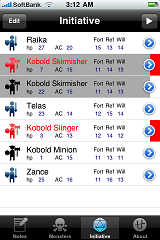
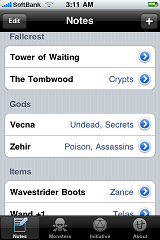
I wrote an app DM Tool for iPhone (originally for my own user but people asked me to submit it) and plan to update it a bit. I use it mostly to prepare before a session all the monsters/encounters and have a list of various quest points and Items I plan to give the party, as well as keeping track of monster HP in encounters. Most of the effort went into the UI like being able to easily apply the same damage to multiple monsters for burst, drag reordering of initiative order, easily seeing monster defenses and keeping track of effects.
Anyway, I posted in another thread but didn't get a reply so I was wondering if you need permission from wizards to allow users to login to the compendium to display content (like the compendium helper app). Also, as there are free downloadable pdfs on the wizards site for beginners would it be ok to include the stats for those monsters as default data in the app. At the moment it looks pretty bare before you start adding them yourself
Its on the app store now and I have about 5 review codes to give to people if anyone wants to review it or give feedback (email paul_@_score-studios.jp) removing the two "_"s
Heres a link to the iTunes Store
Also some screenshots...
If so, does it take into account the complicated 4e math? For example, does it reroll 1s if you have a brutal weapon, roll two dice and take the higher if you have an avenger or danger sense, calculate crit dice, adjust damage for weakened or insubstantial creatures, etc.? If not, does anyone know of an app that does? (I'm sure my group is tired of sitting there watching me add up all my dice on my calculator...
 )
)Just wanted to drop in and clear up some things on i4e.
i4e works great without DDI as you can create a character in the app and then save it back to the import site for easier editing, or you can just edit it all on the device. With the update to iOS4 you can now use bluetooth keyboards with iPhones/iPads so that makes it a bit less painful as well.
i4e doesn't as of yet roll any dice for you but it does calculate critical damage and give exact damage for powers based on weapons used with them. I'm looking at additional ways to improve this and they should be coming soon.
If any of you have any questions about i4e or how its working or not working please contact me at i4e_bugz@cordax.net and I'll be happy to answer any questions.
Mike
Anybody is experiencing the same issue? Have you been able to fix this? Any alternative to use the Compendium on an iPhone/iPod Touch (Safari keeps opening the entry windows outside the screen)?
Mike
Mike
I run your I4e program and I love it! If you also made a Compendium App, or add on too i4e that would be very awesome.
Looking forward too the Ipad versions of both those apps as well.
I've read some reviews, and I know there are people here that use digital resources like masterplan, but I'd like to hear from anyone who has actually used any of the iPxxx applications.
Thanks in advance!
Be sure to try out these apps:
PFR (Pathfinder Reference Document)
Price: $4.99
itunes.com/apps/pfr
d20 Rules (Core, divine, psionic, epic and variant rules)
Price: $0.99
itunes.com/apps/d20
d20 Modern (Modern, future, arcana and menaces)
Price: $0.99
itunes.com/apps/d20modern
All three apps run nicely on the iPhone, but really shine on the iPad :-)
I also downloaded the DM helper app, but really for me the free initiative iPad app does what I need. For everything else I still like scrap paper.
Just thought I'd chime back in now that I used the apps a bit.
OK, so I got the i4e, and I'm not so into it. It doesn't play nice with my iPad, and really although uploading the file from the character builder is nice I like using a pdf displayed on the iPad better the the i4e app.
I also downloaded the DM helper app, but really for me the free initiative iPad app does what I need. For everything else I still like scrap paper.
Just thought I'd chime back in now that I used the apps a bit.
I'm working on an iPad native version of i4e now. I'm hoping to get it submitted shortly but its requiring a lot of changes throughout the app
 You can find screenshots of it at http://cordax.net/forum/viewtopic.php?f=12&t=54&start=30.
Mike
The Compendium Helper was by far my favorite application for iPhone PERIOD. It stopped working (I am assuming due to WOTC blocking content), but I had been trying to reinstall... Now it's gone from the store. I am crushed. The Compendium Helper was the only thing that made by DDI subscription worth the money. I don't understand this at all from WOTC. I paid for the content and now I can't even use it. If they want to build their own branded app that functioned the same way that would be cool, but they don't even seem to have any interest in building their own apps (which is also inexplicable if they are trying to have any tech cred). This is ridiculous. The web based Compendium is clunky and hardly usable on a PC let alone on my iPhone. The Compendium Helper was a FREE app! Just pay the guy a couple bucks and brand it as your own WOTC! Come on.
I have a compendium app that is almost completed but I need to finish the iPad update for i4e first. It was a bit tricky getting the app to work with DDI with regards to authentication but my app still works. It was going to be iPad only but with the removal of the iPhone app I'll probably make it run on both.
Mike
itunes.apple.com/us/app/battle-map/id384...
www.148apps.com/news/idd-battlemap/
This just got released recently. I only got iPhone 4 so smaller screen but definitely wanna check it out.
itunes.apple.com/ca/app/dungeoneer/id379...


Its fun to play with!!!
Just does basic searches right now but it will most likely improve over time.
My DDI Compendium app was just released on iPad, You can find it here, for now its a free app.
Just does basic searches right now but it will most likely improve over time.
I have this app and I really can't use it yet. It doesn't recognize anything other than the title of the power, feat, weapon etc so unless you know part of the name it won't know where to go. So I couldn't say... do a search for level 9 fighter powers. I would at least like to be able to choose a category and browse through that category.
Theres an update in right now that allows for searching outside of just the titles. It also adds iPhone support. There are plans for a pro version to be done in the next few months that will have much more powerful filtering than the free app.
Did the compendium get removed? I do not see it on iTunes anymore.
itunes.apple.com/us/app/compendium/id398...
Can find more info at cordax.net/compendium
Mike
Mike
i4e got an iPad update today, wow what a sexy beast. This is just a raw import, I haven't filled in all the details yet. The way he's done the powers is very cool, click on it and a power card pops up. Once it's used it can be greyed out of just disappear off the list.
I know this is an old post but I have recently saw this in use on a friends iPad and was in awe over what I saw.
I only had 1 gripe in that it had no dice roller.
Having said that, we both said at the same time that the space in the upper right hand corner that is presently empty (above the 'Skills' wording) would be an EXCELLENT place to have a dice roller inserted. At present he's using his iPhone 4 to roll dice using the Mach dice app ... but ... were there a dice app in the presented place, I'm sure you'd see him (and me when my iPad arrives for my birthday ... fingers crossed ...) using this instead.
Just a suggestion I hope you see
The intent of i4e though has always been to just replace the character sheet. I like dice and honestly wouldn't want to play without them. I understand this is a personal decision but it has basically made it so that its a very low priority to add it. Also theres nothing wrong with some negative space in an application
.There has been some talk about possibly adding a character portrait there though.
Thanks for the feedback.
Mike
Mike
I forget what section of the edit power area it is, ill try to check later when i have my ipad on me and internet access.
edit-wow, ninja'ed by i4e itself : )
It looks pretty cool, but also on the pricey side. Is it worth it?
Dungeoneer is out for iPad, imports CB files and pulls all the info from the site, also does die rolls. Cool but needs more work, no crit support on the rolls.
itunes.apple.com/ca/app/dungeoneer/id379...
Is this still availible, I can't seem to find it.
itunes.apple.com/us/app/battle-map/id384...
www.148apps.com/news/idd-battlemap/
This just got released recently. I only got iPhone 4 so smaller screen but definitely wanna check it out.
Maybe when the Iwhore series is complete in 2020 when they release the Itable... Maybe then

itunes.apple.com/us/app/rpgplane-set-you...
For those of you that haven't tried it yet and don't follow me on twitter, the DDI character builder update last week changed the .dnd4e files to include most of the data that had been previously missing. What this means is when you import the file into i4e.cordax.net and then import into i4e on your iphone/ipod/ipad it will contain almost all of the data from the start.
That is great news. I enjoy using i4e on my iPad. This sounds like I will be able to get it moving quicker.
I can't recommend this program enough for people play 4e.
One thing I would like to see is a place to import picture for the character and a place to track failed death saves.
Uploading images is still being discussed.
I wanted to once again thank you for all you do for the community with this app--a really great tool! Thanks, David S.
Tracking death saving throws is coming on iPad and is already available on iPhone/iPod Touch.
Uploading images is still being discussed.
Thanks,
I can't wait for those updates. Although I hope I don't get to use the death saving throws too much
www.rpgplane.wordpress.com
RPGPLANE OUT NOW!
RPGplane features:
-Universal App! Buy once, play on iPod, iPhone and iPad!
-Features 15 different maps with more to come
-Change everything of your checker! From color to size, text and field of view!
-Calculate fog and line of sight
-Interface made for the touch screen! Creating checkers and objects never was this easy!
-Change the grid size to your needs!
-Useful objects such as swords, gold coins, treasures!
You are a fan of D&D or World of Darkness but you hate having to set up your maps and miniatures? Dice-Miniatures collisions disturb your sessions? A dragon has wiped out your table?! No panic, with RPGplane you’ll be able to roleplay even on a plane! There are no rules, so this App is generic for any RPG. Some of the maps in the first version are HUGE.
RPGplane let’s you play your rpg tabletop games with beautifully detailed maps, with the ability to create any kind of checker and change every setting to your needs! Role-playing was never this immersive!
We’re working on user customized maps (we’ll share some spectacular 10.000×10.000 pixels maps as soon as it’s ready). You’ll be able to set every image as a map!
We’re hearing the reviews! Avatars, dice rolling, pre-fabricated maps with monsters and treasures already set are on their way!
RPGPLANE OUT NOW!
RPGplane features:
-Universal App! Buy once, play on iPod, iPhone and iPad!
-Features 15 different maps with more to come
-Change everything of your checker! From color to size, text and field of view!
-Calculate fog and line of sight
-Interface made for the touch screen! Creating checkers and objects never was this easy!
-Change the grid size to your needs!
-Useful objects such as swords, gold coins, treasures!
You are a fan of D&D or World of Darkness but you hate having to set up your maps and miniatures? Dice-Miniatures collisions disturb your sessions? A dragon has wiped out your table?! No panic, with RPGplane you’ll be able to roleplay even on a plane! There are no rules, so this App is generic for any RPG. Some of the maps in the first version are HUGE.
RPGplane let’s you play your rpg tabletop games with beautifully detailed maps, with the ability to create any kind of checker and change every setting to your needs! Role-playing was never this immersive!
We’re working on user customized maps (we’ll share some spectacular 10.000×10.000 pixels maps as soon as it’s ready). You’ll be able to set every image as a map!
We’re hearing the reviews! Avatars, dice rolling, pre-fabricated maps with monsters and treasures already set are on their way!
I also have to say that his Compendium app is great too! I was one of the unfortunate people that bought the WotC one shortly before they yanked it down and made it so it simply didn't work. I was rightfully furious since not only did they stop supporting it but they also kept it from working. The Cordax one is here now though and it gets constant use! My iPhone is constantly being passed around the table at games and we all love it.
Great job on both apps and can't wait to see what you're working on next!
Unless we're thinking of different apps the D&D compendium app that was on the Itunes store for awhile and then stopped working wasn't made by Wizards.
I don't see an android release of i4e coming too soon. I don't have time to do everything I need to on iOS let alone create a build for Android. You won't be sorry if you get an iPad anyhow. They're amazing devices, and i4e is even better than it is on iPhone (for now).
If anyone has comments feel free to PM me on here or email me at mike@cordax.net or post on the cordax forums.
Mike
I did manage to get an iPad2 this weekend and I love the i4e app but I have one complaint.
I got one of the smart covers and I'm left handed. That means the cover is general on the wrong side when I want to hold the iPad straight up and down if I want to grip it by the smart cover. To hold it comfortably like that, I turn the iPad upside down and it everything that supports rotation rotates with it.
I understand that adding a landscape mode would be a lot of work and I don't want to ask for that, but would it be possible to add rotation for when the iPad is upside-down?
Mike
cheers dal64
Mike
Iplay4e is quite good, especially their new labs beta version. The only downside is that it's cloud-based and won't work if you're without Internet (I'm on a wifi-only iPad 2).
I've used DM Tools to track hit points and initiative and was quite happy with it. It can do more than I used it for, but I wasn't interested (for example, it can auto-roll initiative for all combatants at the top of an encounter, but I like to roll physical dice and would never dream of not letting PCs roll their own initiative).
RPG Mapper looks cool, but $30? To run a map on such a small screen? I dunno about that. I'd probably only use it for the odd pit of emergency vacation D&D.
I really wish Wizards would make a Character Builder app or make the online builder iOS compatible, but I haven't seen anything to suggest that's even on their radar.