Hello lovely people, I'm in the process of writing a campaign builder application, and the time has come to put it online for you all to download and criticise. You can find it here. Hopefully it'll make planning adventures and building encounters a bit easier. It's Windows only I'm afraid.
I noticed in your screenshot you have tiles already in the tool, do you have any tiles that could be shared or even perhaps a resource elsewhere people could obtain tiles from?
But i got a question;) how come i only see a couple monsters and no tiles.
i wondered what i did wrong?

Damm cool programma!
But i got a question;) how come i only see a couple monsters and no tiles.
i wondered what i did wrong?
Glad to see that people like it!
You have done nothing wrong my friend - I didn't want to risk copyright infringment by providing all the dungeon tiles for free. Lawyers get twitchy when you do that kind of thing.

If, however, I were to point out a place where the tile images can be freely downloaded, then you could import them into the program and I wouldn't have broken any laws. Everyone's a winner.
As for the monsters, I only added a small set of them as examples. And really, who doesn't love kobolds?
Andy
Second thank you for the quick reaction. Ill will use it right away.

I think i have to agree with you that everyone is a winner with your programme.
Thanks again!
First of all, i love kobolds!
Second thank you for the quick reaction. Ill will use it right away.
I think i have to agree with you that everyone is a winner with your programme.
Thanks again!
Except those of us that are non windows...
Except those of us that are non windows...
If there's enough interest, I can certainly try to build a version for other platforms.
 I could really use something like this. I'll try on a different computer this weekend.
Yep. Trouble's on my end. Just checked with the boss. Says it's the company firewall or something. He's had similat trouble elsewhere.
Downloaded it, but it wouldn't run. Windows XP, plenty of resources on the machine, says it encountered an error and has to close.
Yep. Trouble's on my end. Just checked with the boss. Says it's the company firewall or something. He's had similat trouble elsewhere.
May well be the .NET framework; if that's missing it gives an error message when you run it.
YESSSSSSSSS!!!!!! Thank you thank you thank you, can't wait to get home and really play with it! (ooh, that sounded dirtier than I meant it to...:embarrass :D )
I can't download any tiles. I keep getting the 'page not found' screen. I followed your link and all, but can't get any of the tiles.
It looks like his site is having problems just now.

Is 4ed only or can you make it support 3ed?
I can't download any tiles. I keep getting the 'page not found' screen. I followed your link and all, but can't get any of the tiles.
same problem here

It looks like his site is having problems just now.
I'll try back later this weekend, or later next week if that doesn't work. Thanks!
For this you do not deserve a cookie, but instead a crown.
I'm glad people like it!
Is 4ed only or can you make it support 3ed?
It's 4e currently - by which I mean that the encounter builder, skill challenge editor and custom creature builder all use the 4e rules.
Also the program tracks XP gains and tells you at what point the party is likely to level up, and that uses 4e rules too.
The rest of the program is pretty much edition-bllind. You can sketch out plots and put maps together, those kinds of things are not affected by the game edition.
It's times like these i wish i had a PC
I feel your pain...

On that screen the blue counters are heroes, the others are monsters (red for bloodied, gray for dead). The slider at the right changes the current initiative, which highlights those that can act on that score.
Does that make sense? I'm still tinkering and refining it, so feedback would be appreciated!
I still can't get any tiles. Are they big files? Can you send me yours?
Yeah sure. You might also want to email the site owner and see whether he can sort his site out.
Thank you for this program. Your efforts are greatly appreciated!
I have already transfered a lot my notes into your program. I love the flow chart, the summaries that pop up when you mouse-over the plot points, the encounter builder. I will be using your program as my primary planning tool. You are undoubtedly a very talented programmer, and I say, Thanks for the hard work that makes my work easier! I am very grateful for your work and this wonderful program!
-W
p.s.
Is there a way to drag and drop plot points around to any place in the workspace ? I read through the manual, but my eyes are tired so I could easily have missed it.
Is there a way to apply word-wrap to the windows that pop up when you mouse over a plot point?
I tried to put in monsters from the MM, but couldn't get the damage dice right. I was putting in the Macetail Behemoth and none of the damage die listings offered matched the ones listed in the MM. Is there a way for me to change this?
I may be stuck on stupid, but is there a way to scan in tiles? I have sets that aren't in the libraries but would be great to add in.
I am truly astounded at your program, Devereaux!
I have already transfered a lot my notes into your program. I love the flow chart, the summaries that pop up when you mouse-over the plot points, the encounter builder. I will be using your program as my primary planning tool. You are undoubtedly a very talented programmer, and I say, Thanks for the hard work that makes my work easier! I am very grateful for your work and this wonderful program!
Thanks very much!
Is there a way to drag and drop plot points around to any place in the workspace ? I read through the manual, but my eyes are tired so I could easily have missed it.
Not to any place, no. Plot points are arranged in flowchart order.
Is there a way to apply word-wrap to the windows that pop up when you mouse over a plot point?
Not currently, but I'm working on it.
This is pure genius -- the plot flowchart thing is the best thing that has ever passed into my GMing hands, even thogh I haven't ever lead a 4E campaign. But I'm using Masterplan to chart an upcoming 7th Sea campaign, and damn is it ever useful!
Ah, 7th Sea, my first love.
I tried to put in monsters from the MM, but couldn't get the damage dice right. I was putting in the Macetail Behemoth and none of the damage die listings offered matched the ones listed in the MM. Is there a way for me to change this?
It sounds like you're using the custom creature designer. To add creatures from the MM (et al) just use libraries.
I may be stuck on stupid, but is there a way to scan in tiles? I have sets that aren't in the libraries but would be great to add in.
Well you'll need a scanner obviously, but yeah, Masterplan will make tiles out of any image file you want to give it.
Are you aware that the custom creature designer doesn't quite match the guidelines in the DMG? Defenses seem to advance by 1/2 level, not level.
Bug? I will check, ta.
Cant get the links to work for the tile downloads though, anyone else having trouble with that? Ideas?
Again Awesome effort, keep it up!!
The download link is here as before.
Hope you like it.
I love the functionality of the project in general. I can go as deep or as shallow in the process as I please, and there's plenty of room to expand just through user input. I never feel limited.
I'd like to ask for a monster pack but I know that's prolly not kosher with wotc sooo... Maybe a user created monster pack? I'll look into the combat handler soon, so far I've only made a cursory look through some of the functions more in tune with my personal needs, but expect more criticism soon ;).
You deserve a few of these

Minor bug, dunno if you know about it yet[...]
Cheers. I'll maybe post a minor update with bugfixes in a few days.
Could someone explain to me how to get the other tile sets? Am I missing something, or is that not a functionality?
Your options are:
Sadly it looks like the site I found them at no longer has them.
http://www.wizards.com/default.asp?x=dnd/dnd/20061121t
Just click the "Download" link, and unzip the DT1 through DT4 folders.
Has anyone else had a problem with it erasing all the libraries when you close the program?
As a matter of fact, I did. Except mine happened when I shut down my computer. But after I re-imported the libraries from the zip, it seems to work fine, and I've had no problems with it since.
Very strange.
As before it can be downloaded from here.
The next version, in response to some feature requests I've received, will have the ability to display a separate view of an encounter for players, which will hide all the DM's info.
Now I'm just worried I was too tired to save properly yesternight, 'cause I can't find it where it should be, and saving and loading other projects seem to work fine. *sigh* Guess that's four hours of work I'll have to do all over again 'cause I was too dumb to double-check saves before closing the application. :/
Yeah okay, protip for people, if your project name isn't a legitimate file name (I myself used a colon) the save as function doesn't really do anything. No idea how I managed to miss that the saving didn't actually make anything happen, but there ya go. -_-
Could be neat to add a little warning prompt when a file can't be saved under it's current name for those of us who like to do our writing in the middle of the night hopped up on caffeine and smokes to the point where our attention span equals that of a newt. ;)
Just posting to say I love this tool. Encounter builder and all that is neat I suppose, but really, I'm mainly just using the flowchart, which is FANTASTIC once my campaign starts branching out in all different possible directions. Makes it a lot easier to keep track of several likely PC actions as well. I love this little program to bits.
Always nice to hear from a satisfied customer!
Now I'm just worried I was too tired to save properly yesternight, 'cause I can't find it where it should be, and saving and loading other projects seem to work fine. *sigh* Guess that's four hours of work I'll have to do all over again 'cause I was too dumb to double-check saves before closing the application. :/
Yeah okay, protip for people, if your project name isn't a legitimate file name (I myself used a colon) the save as function doesn't really do anything. No idea how I managed to miss that the saving didn't actually make anything happen, but there ya go. -_-
Could be neat to add a little warning prompt when a file can't be saved under it's current name for those of us who like to do our writing in the middle of the night hopped up on caffeine and smokes to the point where our attention span equals that of a newt. ;)
I just tried saving a file with a colon in the filename. It warned me it wasn't going to work. Just how much caffeine were you on? Do we need an intervention here? ;)
I am truly intrigued by the dungeon tile mapper. If anyone finds out a way to access more tiles, let me know. That would take this tool over the top for me.
TLR
For those asking for tiles, the WOTC dungeon mapper, which is free, contains the tile images for DT1 - DT4. There's also a dungeon_tiles group on Yahoo Groups.
Great tool. I am amazed that WotC doesn't get the idea to help the DM like this. The Character Builder is a fine piece of software, but if no one writes an adventure, then no game happens. And being as I work more than full time, I need something like your tool to ease the task.
Masterplan users,
Is anyone creating creature libraries to test? I'd like to see other folks efforts. It is an arduous task at best to fill the tool with data so that I can then actually start building an adventure.
Keep up the good work!
peace,
Darth Frodo
Bring me the One Ring...and no disintegrations!
1 - I love this tool, it is better than sliced bread both in utility and taste.
2 - It desperately needs more tiles, does anyone know where I could find some?
3 - I was just kidding about three things.
Two things:
Keep letting me know what new features you'd like to see in future versions!
For some reason, it won't let me add NPCs at all. The box comes up, but I can't click any of the options, Add, delete, etc. This is regardless of when I created the campaign. In an experiment I made, it still wouldn't let me add in an NPC.
(Image of error located here.)
Beyond that, this is still my new favorite way to make my D&D campaigns. Best. Program. Ever.
For some reason, it won't let me add NPCs at all.
Oh, before you can create NPCs, you need to have at least one class template in your libraries. I'll add that note to the manual.
Let me know if that fixes it.
If there's enough interest, I can certainly try to build a version for other platforms.
I am professing interest in a Mac version. This looks rather useful.
The only thing that I would like to see added is an easy way to manipulate hit die for attacks.
So, the ability to define powers properly for creatures and NPCs? I've held off on this because it would mean a lot of additional work when you're entering monster info, but it could be done. And then in combat you'd see all the creature's powers.
I am professing interest in a Mac version. This looks rather useful.
I'd love to do this, but I'd have to invest in a Mac. Although if I did, I'd be able to adapt it as an iPhone app, which might be fun.
I have a few Ideas, when running through the program, I noticed that monsters have no block for their attack value, such a block could prove useful.
Also the ability to color code both monster tokens and objects in the flow chart would be greatly appreceated.
So, the ability to define powers properly for creatures and NPCs? I've held off on this because it would mean a lot of additional work when you're entering monster info, but it could be done. And then in combat you'd see all the creature's powers.
Actually, I just meant a "hit backspace, type in your own die," or "have an up and down arrow button to go 1d4, 1d6, 1d8, 2d4, 1d10, 1d12, 2d6... and so on." I didn't want anything that complex; and I actually prefer the ability to type up your own descriptions for monster powers. All I wanted was a way to edit the damage die.
Actually, I just meant a "hit backspace, type in your own die," or "have an up and down arrow button to go 1d4, 1d6, 1d8, 2d4, 1d10, 1d12, 2d6... and so on." I didn't want anything that complex; and I actually prefer the ability to type up your own descriptions for monster powers. All I wanted was a way to edit the damage die.
Ah, got you. Sure thing, I'll give that a go.
Very useful, I like it a lot. One bug I think I found: whenever I change the autogenerate encounter settings to the hard difficulty (I have a party of 4, level 2) the program crashes.
Email me your file, and maybe your libraries too if you've added anything to them, and I'll check it out.
Nice, but I wish it would run on Macs.
That would be awesome. It may happen in the future.
So, the ability to define powers properly for creatures and NPCs? I've held off on this because it would mean a lot of additional work when you're entering monster info, but it could be done. And then in combat you'd see all the creature's powers.
This would put it over the top for me. As it stands it's an awesome program, and has easily saved me hours of prep time this week. I've been looking for something like this forever. One doesn't need to be a computer expert to use it either.
I would also like to be able to print a copy of the flow chart and each encounter. I don't have my computer with me when I DM, and I do not own a laptop. Although I may buy one just because of this program. Copy and paste is no big deal, but a way to do it through the program would be awesome.
The only issue I have is with the game elements tab. I can only ever add one. I.E. I can't add an encounter and add a skill challenge or quest to the same plot point. Is it supposed to be like that, or do I have a bad download maybe?
To sum up this is the most usefull tool for DMs I have ever seen. You should put a link on your webpage that lets people donate money to you via a paypal account or something similar. I know I would.
I don't want to link to the software without permission from you...
It's awesome by the way. Although I found a problem with the mapping libraries. I imported my own dungeon tiles, and it resized them to the small size resolution. Can't real scaled tiles be imported an printed out at 1" scale?
Let me know about hiliting this on my blog, I'd really like to do a write up.
I would also like to be able to print a copy of the flow chart and each encounter. I don't have my computer with me when I DM, and I do not own a laptop. Although I may buy one just because of this program. Copy and paste is no big deal, but a way to do it through the program would be awesome.
You can print the flowchart from the File menu, and the encounter map from the encounter builder. Or do you mean all in one go? I could add that.
The only issue I have is with the game elements tab. I can only ever add one. I.E. I can't add an encounter and add a skill challenge or quest to the same plot point. Is it supposed to be like that, or do I have a bad download maybe?
Yeah you can only add one game element to a plot point. If you need to add multiple game elements, you could add them into a subplot for that plot point.
Please let me know if I can blog about this software on my blog!
I don't want to link to the software without permission from you...
It's awesome by the way.
Publicise away my friend. The more people that use it, the better.
Although I found a problem with the mapping libraries. I imported my own dungeon tiles, and it resized them to the small size resolution. Can't real scaled tiles be imported an printed out at 1" scale?
Hmm. Are you saying the import wasn't able to work out the tile dimensions, or that when you printed the map it wasn't at a 1 square : 1 inch scale?
If it's the latter, yeah. I am still trying to work out how to get the dimensions of the printer.
I imported a 4x4 true scaled square piece, and it read it as a small 1x1 piece.
Ah, OK. If you imported a set of tiles with the Add Folder option, it assumes that the smallest dimension it finds is the length of a square (in pixels). So if they're not all at the same resolution, it won't always get the dimensions right.
You can print the flowchart from the File menu, and the encounter map from the encounter builder. Or do you mean all in one go? I could add that.
Yeah you can only add one game element to a plot point. If you need to add multiple game elements, you could add them into a subplot for that plot point.
Doh! I must have missed the print command in the file menu for the flowchart. Not the most computer literate person here.
For the encounters I meant a text document showing the number of each enemy, as well as each enemy's stats. How about for the DCs and skills for a skill challenge. As well as the consequences for success and failure in a skill challenge.
Also; is it possible for someone to set up a place for people to upload libraries to share? That way we all won't have to input the stats for every monster.
For the encounters I meant a text document showing the number of each enemy, as well as each enemy's stats. How about for the DCs and skills for a skill challenge. As well as the consequences for success and failure in a skill challenge.
Yeah I have that planned.
i hope see more versions in the future with illussion. ¡Thanks!
If you need any help with a 3.5 version, not coding, just typing monsters and spell-effects into the program, I'd be glad to help as I'll probably do a significant amount of that on my own anyway.
I spent two hours last night downloading the program and entering tiles into the libraries, but god it was worth it.
You spent two hours on tiles?! How many do you have?
as well as those from the MM. I understand the trouble with the MM, I'm just too strapped for time to input the critters myself. What if I sent a picture of me holding the book in trade for the library with all it's data :D noooot really.
Basically, the input process should be momentous but the benefits of going through with it pay off for every campaign to come. Brilliant design.
Question, how do I get the new tiles I've added to the autobuild feature. I was using it so when players went ??? direction BAM I could fly by a dungeon and catch em off guard (we do an online game so insta dungeon really). Also just seeing some of the random dungeons it makes to begin with is impressive, I've enjoyed expanding on them. It's a bit daunting going tile by tile when you have a blank slate.
Also the autobuilder on the monster seems a bit, meh. Works but not nearly as well as the rest of the stuff. It makes the same 5 encounters over and over, and as I try to make more detailed rules to the randomness it can't think of anything. Seems like it freezes, but if you give it time it just says something to the effect of "no ideas" (saw someone else with similar problem and all I did was leave it alone for 10 minutes and wasn't frozen).
And just for your info I'm a vista user and everything seems to work, which is more than most programs I've paid money for.
Question, how do I get the new tiles I've added to the autobuild feature.
You need to tell the system which tiles represent open space, doors, stairs etc.
Also the autobuilder on the monster seems a bit, meh. Works but not nearly as well as the rest of the stuff. It makes the same 5 encounters over and over, and as I try to make more detailed rules to the randomness it can't think of anything.
I've only added a few monsters to the system; the more you add, the more options it'll have when it's building an encounter.
I would love to see the ability to increase thumbnail size on the tactical combat map tile selector.
A nice idea. This'll be in the next release.
the map building part looks awesome. I will try this out when I get home!@
I only found DT1-DT4. Btw, after I downloaded the tiles at first, it erased all of the libraries, including the preloaded ones. I re-downloaded an that seemed to solve the problem, but I just thought I'd mention it.
I love it. Will test it tomorrow properly and maybe have some more feedback.
Thank you sooooo much!
First, sadly a bug. I've added a tile library, everything worked correctly, I've even done a tactical map and saved it and the corresponding encounter. But when I opened the program in a couple of hours the library was empty. It still was there, but there were no tiles in it. The map stayed BTW.
Now on to the features suggestion.
1. It would be neat to add Initiative rating to PCs stats and have the program roll for them too when you run the encounter. They would still stay out of the map initially and out of init order, but when you drag them on the battlefield the init promt would display init rolled, not zero. This way ppl who like to roll real dice for init would fill the result and those who (like me) prefer the program to do it for them would just press Enter and go on.
2.A slight problem with init order is that PCs/monsters with the same init result are sorted in... ABC order I guess and there is no way to rearrange them except for retyping some other number. Would be great if you could drag them with a mouse to any position you like. If the init result changes accordingly - that would be even better. That would also help with delays and prepared actions. Oh. And they all go at once - should be separated somehow I guess.
3.And another thing I'd like to see is the ability to track conditions/ongoing damage not only for monsters, but also for PCs. No need to track their HP or something, but a helpful message "This creature takes 5 fire damage" or "Would you like to roll a save against the immobilization" would be great. Of course there should be a way to enter the result for PC save (ppl like to roll dice
).4. This one is not strictly neccesary, but would be just a winner IMO. Wouldn't it be great if when a monsters turn comes, there is his stat card (the WotC style) displayed somethere? Of course only the things we typed in would be displayed, but as far as I see we can type a complete stat block if we choose so, why not display it? That way we'll have all we need to run an encounter on one neat page, no alttabbing, no searching the books...
All that said the program is incredibly great already. Hope WotC take notice and offer you an employment
Just don't drop it, please.
Couple of improvements to the way plots are shown, and a few requested features added (changing map tile thumbnail sizes, adding maps directly to plot points, showing creature cards in the combat window). Other additions are on their way, so keep the feature requests and feedback coming.
Link is here as usual.
A feature I would like to see. You are able to create custom creatures and give them powers and such, but when running an encounter, you're not able to view any of the powers the creature can use. I'd like it if you were able to pull up the same screen from the custom creature editor. That way we don't even need to have monster stats or cards or such to run the encounter.
Okay, that was creepy. Seriously though... NICE.


Thank you. This weeked I'll run two games of my two campaigns using your tool and will check back to tell the tale about it .
Oh! Almost forgot. Have a
!IMHO, there are plenty of virtual desktop gametables (Fantasy Ground, Battleground, etc) and making MasterPlan into another one would be a misuse of effort, particularly if WotC gets it in gear and finishes their 'official' version. The one thing missing from the D&D software landscape, the thing that no one, not even WotC has created, is what MP started out to be; a campaign creation tool. The flowchart system, wherein you can build your encounters, skill challenges and maps is ACES! Once the growing MP community creates more libraries that we can share amongst ourselves, the more useful it will become.
Like I said, this is my humble opinion, but as a 'grown-up' busting my hump to keep up with work, family and the like, it leaves far too little time to create a playable campaign. I believe that MasterPlan can bridge that gap. So as you add all these wonderful and useful bells and whistles, don't forget those of us who just need some support in the actual writing and organizing of the campaign.
Onward!
Darth Frodo
Criminals of Prophecy - We take nothing that is not ours. If it's not nailed down...it's ours.
Bravo sir.
Devereaux,
IMHO, there are plenty of virtual desktop gametables (Fantasy Ground, Battleground, etc) and making MasterPlan into another one would be a misuse of effort, particularly if WotC gets it in gear and finishes their 'official' version. The one thing missing from the D&D software landscape, the thing that no one, not even WotC has created, is what MP started out to be; a campaign creation tool. The flowchart system, wherein you can build your encounters, skill challenges and maps is ACES! Once the growing MP community creates more libraries that we can share amongst ourselves, the more useful it will become.
Like I said, this is my humble opinion, but as a 'grown-up' busting my hump to keep up with work, family and the like, it leaves far too little time to create a playable campaign. I believe that MasterPlan can bridge that gap. So as you add all these wonderful and useful bells and whistles, don't forget those of us who just need some support in the actual writing and organizing of the campaign.
Yeah, the main new features in the next version will be pretty much focussed on making it easier for people to write adventures. One feature is aimed at people who are writing long campaigns, and one is for shorter delve-style games.
But all in all, love the program. Its amazing.
First off, this program is sweet. secondly, is there a way to import an entire folder worth of tiles? or do i have to import them one by one into the library?
Yep, you can use the Add Folder option. Press the down-arrow beside the Add button you use to import tiles.
Chiming in to agree with how awesome I think this app is.
Always nice to hear from satisfied customers. Just wait until you see the new features.
Chiming in to agree with how awesome I think this app is. I would love a 3.5/3 edition as well, but either way, it's an awesome program.
I think that if you made the flowchart feature agnostic, which as I have stated before is my favorite part of the program, it could be used for ANY game or (I'm a fiction writer) story/plot construction. Out of the multitude of programs out there for story structure, NONE of them do what this simple tool does.
Keep up the great work. You are on to something big.
Peace,
Darth Frodo
I think that if you made the flowchart feature agnostic, which as I have stated before is my favorite part of the program, it could be used for ANY game or (I'm a fiction writer) story/plot construction. Out of the multitude of programs out there for story structure, NONE of them do what this simple tool does.
Keep up the great work. You are on to something big.
Peace,
Darth Frodo
I agree. I don't use 4e rules, but I'll just throw whatever I want into the text boxes and try to use the other features as best as I can. The plot crafting part is the part I like the most. Everything else does make things easier. If it was possible to "generic-ize" things a bit more, it would be a little less useful for 4e players, but much more useful to RPG players in general.
Whenever I try to install the program Windows encounters an error, what do I do?
What is the error?
Make sure you have .NET 3.5 installed.
yes, I have .net 3.5 installed, and the error is a typical "Mastermind has encountered and error and needs to close" error. How do I fix it?
Odd; not much for me to go on there, but firstly make sure all the files are in the same folder.
Secondly, run the program with logging. Make a shortcut to the program, and open its properties. In the 'target' line add -log at the end. Now when you run the program it'll create a logfile if something goes wrong.
I would be very appreciative towards anyone who can see their way clear to sending me the a copy of the tile and monster libraries, the links mentioned previously in this thread don't seem to be working (admittedly they are almost a year old by now). I can be reached at vigaxe-at-gmail-dot-com if your feeling generous.... :D
Many thanks again Devereaux, this is great stuff.
A suggestion I have would be to have a seperate section for non combat PCs. So that you can keep notes on them, that way if they are reoccuring characters, you don't have to go look for the section you introduced them in.
Great builder again.
I think i have found a bug. I found the dungeon tiles but when i add them to the library with the "Add folder" option they don't sow up on the Autobuilder. The only one it's sowing is the default "DT1 Dungeon Tiles".
The library's sow-up normally in the right side bar and when i added a tile with the manual option it sowed on the Autobuilder so is it a bug or am i doing something wrong?
Cheers!!!
Hi first of all great software, i'll defenetly going to use this.:D
I think i have found a bug. I found the dungeon tiles but when i add them to the library with the "Add folder" option they don't sow up on the Autobuilder. The only one it's sowing is the default "DT1 Dungeon Tiles".
The library's sow-up normally in the right side bar and when i added a tile with the manual option it sowed on the Autobuilder so is it a bug or am i doing something wrong?
Cheers!!!
Oh, it sounds like you're adding the new tiles to the DT1 library.
And, when you add a folder of tiles, they're all set by default to the 'special' category; the autobuilder will only use tiles marked as open, doorways, stairways or features.

Lots of little improvements and polishes here, but the new features I think you'll like most are the following:
Download link is here. Let me know what you think!
This software is awesome! one prob: there are no maps in it?! I'm confused
The program doesn't contain predefined maps; instead it has tiles, from which you can build your own maps. Go to Tactical Maps on the Tools menu.
Does that help?
The program doesn't contain predefined maps; instead it has tiles, from which you can build your own maps. Go to Tactical Maps on the Tools menu.
Does that help?
I'll try it out. ty, i'll come back if it doesn't work
awesome tool btw!
Update: it's grayed out.
I'll try it out. ty, i'll come back if it doesn't work
awesome tool btw!
Update: it's grayed out.
Make sure you've created a new project to work with, and that you have a library with map tiles in it.
There's a pretty extensive user manual that should answer all your questions.
Make sure you've created a new project to work with, and that you have a library with map tiles in it.
There's a pretty extensive user manual that should answer all your questions.
Alright so the map feature is working now, but I have another question- is there a way to get more tiles, since I need outdoor tiles?
Alright so the map feature is working now, but I have another question- is there a way to get more tiles, since I need outdoor tiles?
First go DL this tile mapper http://www.wizards.com/default.asp?x=dnd/dnd/20061121t
unzip it and then follow the instructions on Masterplans PDF file page 45 under Tiles.
--
Any update on more Libraries? In the PDF file you have pics of multiple libraries with plenty of monsters. Any chance we could get our hands on those?
I can't really distribute other libraries; I don't want to infringe copyright!
Maybe add a prompt before removing libraries, while fiddling with it testing out some things i accidentally removed the MM :P
I already have a database of beasties and I'd like to just blast them in.
I had a look at the Monster Manual.library file and it seems to be a serialized version of some object.
Cheers,
Reggie
Is there a way to generate the monster library file or import monsters on mass?
I already have a database of beasties and I'd like to just blast them in.
I had a look at the Monster Manual.library file and it seems to be a serialized version of some object.
Cheers,
Reggie
Is your database in any particular format or schema?
Is your database in any particular format or schema?
I'm running SQL Express 2005. Its really only got the essentials (well what I consider the essentials) - names, maxhp, bloodiedhp, level, role, initiative and the url for the monster in compendium. Around 210 monsters at the moment.
I can write a tool to dump it any format that could work and then hopefully import into your app.
I tried again, this time with just the tiles that are already in neat folders. When I saved and exited, all of them were lost. Is there any way I can keep these libraries for more than 1 session?
so I got all the internet dungeon tiles, and manually got all the MM and MM2 onto masterplan. I save my project, and exit it. When I open back up i'm back to the default area, everything I did was gone. why????
This may be a silly question, but did you open your project again?
There should be a Log folder in whatever folder Masterplan is in. Send me any files that are in there.
This may be a silly question, but did you open your project again?
There should be a Log folder in whatever folder Masterplan is in. Send me any files that are in there.
I did open it again, and the only things in the library were the defaults. In the log folder there's nothing
EDIT: however, the maps I made with the disappeared tiles are still there. and so are the encounters. The things are just gone from the database
I did open it again, and the only things in the library were the defaults. In the log folder there's nothing
This is a very annoying bug that other people have reported, but I can't get any information on what's causing it. The only advice I can give you is (a) make sure the program is running with full permissions and (b) people say the bug goes away.
EDIT: however, the maps I made with the disappeared tiles are still there. and so are the encounters. The things are just gone from the database
Yes, your project itself should always be fine.
This is a very annoying bug that other people have reported, but I can't get any information on what's causing it. The only advice I can give you is (a) make sure the program is running with full permissions and (b) people say the bug goes away.
Yes, your project itself should always be fine.
So I will get those things back? because I restarted my computer and now the defaults aren't even there.
I'm not sure why the default libraries would have been deleted, but at least you can get them again.
As I say, make sure the program is 'unblocked' when you run it; on Vista at least, and possibly on XP, when you download a program it runs with reduced permissions by default, unless you unblock it.
Also, run Masterplan and then open the project from within it; don't double-click on the project file and associate it with Masterplan.
Anything that didn't get saved properly is gone I'm afraid.
I'm not sure why the default libraries would have been deleted, but at least you can get them again.
As I say, make sure the program is 'unblocked' when you run it; on Vista at least, and possibly on XP, when you download a program it runs with reduced permissions by default, unless you unblock it.
Also, run Masterplan and then open the project from within it; don't double-click on the project file and associate it with Masterplan.
How do I get te default libraries back? what do I have to unblock a program? I've never heard of that. Lastly, woops I didn't realize that, there's my problem perhaps.
EDIT: nvm the default libraries are back. still need to know how to "unblock"
How do I get te default libraries back? what do I have to unblock a program? I've never heard of that. Lastly, woops I didn't realize that, there's my problem perhaps.
To get the default libraries back, just get them from the ZIP file you downloaded.
To unblock Masterplan, right-click on the application file and select Properties; if it's blocked, there'll be an option at the bottom to unblock it.
And yeah, if you open a project file in Windows, rather than from within Masterplan, the libraries may not be loaded - it's a bug I'm working on. Try that first, and see whether any libraries reappear.
To get the default libraries back, just get them from the ZIP file you downloaded.
To unblock Masterplan, right-click on the application file and select Properties; if it's blocked, there'll be an option at the bottom to unblock it.
And yeah, if you open a project file in Windows, rather than from within Masterplan, the libraries may not be loaded - it's a bug I'm working on. Try that first, and see whether any libraries reappear.
The libraries didn't reappear likely because I added them to a version that I made that wasn't opened using the program. Turns out it was blocked, and I unblocked it, should I be able to add and keep libraries now?
EDIT: Never mind. I tried again and as soon as I exit the one I'm working with, the libraries are gone
EDIT2: something else I noticed: even though the libraries are gone, I'm not able to make a new libraries with their old names.
The libraries didn't reappear likely because I added them to a version that I made that wasn't opened using the program. Turns out it was blocked, and I unblocked it, should I be able to add and keep libraries now?
EDIT: Never mind. I tried again and as soon as I exit the one I'm working with, the libraries are gone
EDIT2: something else I noticed: even though the libraries are gone, I'm not able to make a new libraries with their old names.
Odd... try searching for library files in windows, see if it's saved them somewhere else by accident?
Odd... try searching for library files in windows, see if it's saved them somewhere else by accident?
DT3.library C:\documents and settings\me\desktop
So for some reason it's not saving to masterplan. argh!
DT3.library C:\documents and settings\me\desktop
So for some reason it's not saving to masterplan. argh!
That might be the root of the problem! How do you start Masterplan, from a shortcut or directly?
Move the library files to the same folder as Masterplan, and start it from there.
That might be the root of the problem! How do you start Masterplan, from a shortcut or directly?
Move the library files to the same folder as Masterplan, and start it from there.
I'll try that when I get back in an hour or two cause I g2g. I'll keep you posted
well...
that'd be awesome.
Good news! Even with my limited computer skill I have gotten my libraries back and I know why this "glitch" can occur: if you save your project to your desktop and save a library to the project, rather than retaining the library in your project and in masterplan, it puts them on the desktop. To solve this problem, put your project, along with the libraries in the masterplan folder, and you will have them back.
Ah, that might explain it. I'll post a fix for this shortly.
This is an excellent idea, my fondest wish is that it is very comfortable printing. I prefer, as do many I know, not to have laptops at the gaming table. If this software can churn out 20 pages of PDFs or even just be smart enough to organise all of the information in an 8.5x11 fashion...
well...
that'd be awesome.
I'll add that to my to-do list! Thanks for the feedback.
I mean it would read text copied and pasted from the dnd compendium, with a little bit of editing, instead of a whole mess of typing? It should be a minor pain at worst (cake at best) to program in a String converter, especially when considering the modular build of dnd monster stats, and it will make inserting the monsters easy, hopefully without infringing on copyright
This is my request, almighty Devereux, please grant me this wish and your name will be immortal within my campaigns.
I've got it! Would it be possible to have the masterplan read statlines in a way similar to the capability proposed for the character builder?
I mean it would read text copied and pasted from the dnd compendium, with a little bit of editing, instead of a whole mess of typing? It should be a minor pain at worst (cake at best) to program in a String converter, especially when considering the modular build of dnd monster stats, and it will make inserting the monsters easy, hopefully without infringing on copyright
This is my request, almighty Devereux, please grant me this wish and your name will be immortal within my campaigns.
I'll put it on the list.
Devereaux DevereauxHi, That is a amazing tool, just amazing!
I just thought of one thing, among others, Is it possibli to make this for D&D 3ed/3.5ed? Or D20Modern??
We have not, and most likely never will, upgraded to 4ed so there you have the first question.
For the other question, I'm trying to craete my first campaign in Modern and this will come in really handy.
Evilo
Its all a pretty little Program but you can do the same with Microsoft WORD.
There are many things you could probably do better with Word, like player handouts, but Word won't tell you how much XP an encounter is worth.
Or let you build maps from tiles.
Or tell you when you've added too many treasure parcels.
Or let you run an encounter and show you the stats for all the creatures.
Or let you apply a template to a creature and automatically update its stats.
Or build you an entire delve scenario with 5 mouse clicks.
;)
Plus i'm fairly certain that a flowchart needs to be a mesh and the links away from the village should link to where they can flee to once they discover that there has been an invasion.
You are more than welcome to come up with a more interesting example plot!
Devereaux
Hi, That is a amazing tool, just amazing!
I just thought of one thing, among others, Is it possibli to make this for D&D 3ed/3.5ed? Or D20Modern??
Evilo
I think the 4E rules (like rules for XP and creature stats) are just too much a part of the system to swap them out easily, but maybe sometime in the future, if I have a lot of time on my hands!
For now though, you can use Masterplan without its encounter / skill challenge features. Hopefully it's still of use as a pure story builder.
EXCELLENT tool! Just the ability to manage plot points at such a level of detail is worth the effort to learn it; when I discovered the ability to incorporate game elements into those plot points, it's suddenly became one of the most effective tools in my toolbox. Well done.
I would like to second (or third? Fourth? I've lost track) the point about easy printing. I dislike using laptops at the game table, and a good printing function would make Masterplan even more useful. Right now, with no ability (that I can find) to easily print out NPCs or creatures, I'm basically just using the tool to plan the campaign (which it's great for. Thus the name, I imagine....)
The other issue I've run into is the way Masterplan handles tile sets. I loaded most of the available tile sets into the tool, which resulted in Masterplan running a cache size that rendered my computer inoperable. I had to shut down. I restarted, and launched Masterplan again, and it was once again up to a memory commit size of over 700k. After I removed all the tile sets I had loaded into the software, the problem went away. Do you have any plans to tweak the software such that it can manage the libraries in a more memory efficient manner, or should I just avoid using tiles in the program?
Thanks for all your hard work. I know I'm repeating myself, but this is a really excellent tool.
Just got it and started playing with it. I won't really utilize it for my game until a print-friendly update comes out though. BTW; you have a paypal donate link on the page?
My feature request: Autosave.
My other feature request: A way to input monsters directly from the Compendium.
My other other feature request: More than one input for speeds. Some monsters have a regular speed, and a climb speed, or a swim speed, or a fly speed, and there's nowhere to really input that. Also, a place for Action Points.
Otherwise, awesome program, and I'm loving it just from the 5 hours I've used it. *sigh* Now if only I'd saved it...
After 5 hours of work inputting the monsters that I wanted for the next 5 sessions, my computer crashed. I freak out, run back to the program, panicking. Of course, I had forgotten to save the files, and 5 hours of work inputting over 20 monsters are now lost.
My feature request: Autosave.
Oh dear; I hope it wasn't Masterplan that crashed. AutoSave sounds like a useful thing to add, yeah.
My other feature request: A way to input monsters directly from the Compendium.
My other other feature request: More than one input for speeds. Some monsters have a regular speed, and a climb speed, or a swim speed, or a fly speed, and there's nowhere to really input that. Also, a place for Action Points.
I would dearly love to be able to connect to the Compendium database. That would make everything so much easier
I'll add those suggestions to the list.Great tool!
Just got it and started playing with it. I won't really utilize it for my game until a print-friendly update comes out though. BTW; you have a paypal donate link on the page?
Well as 150 of you (according to my ISP) already know, yesterday I uploaded the new version of Masterplan which includes:
And lots of other stuff. You can find it here. As always, all feedback greatfully received.
Edit:
I was wondering about dialogue. Since this is a Campaign Builder and not a Dungeon Builder, has anyone found an easy wasy to express dialogue with an NPC? I've been trying out different things, but it doesn't look very good when you try to put a question/answer area within the plot or subplot details since all of the text gets bundled up. It would be great for the dialogue to look like the skill challenges when it's all typed out.
3 things:
1) Minor gripe, but my eyesight is quite poor and when I first open Masterplan the options under Masterplan are quite small. I struggle to read it. I think the smaller size combined with being blue on white makes me struggle to read it.
2) Exporting to HTML works if I select the option fom the Tools menu. But you also have Export Project in the File menu whihc doesn't do anything.
3) Is there anyway I can edit what Easy, Medium, Hard and Extreme DCs are in Skill Challenges to be in line with the system I use? What I mean by thius is that I have actually modified the DCs using the option when I add a skill to the skill challenge, but it tells me that something is Moderate when I want it to say Easy? Just a minor gripe as it doesn't actually reduce the functioanlity of this tool for me.
Keep up the good work!
EDITED TO ADD:
Sorry to keep bugging you, but for those people that have a big ego, like me, could we possibly have a "Campaign Author" input somewhere, and when we export it to HTML, it would have:
[Name of Campaign]
An adventure for [X] characters of level [Y].
By [Name of Author]
I was wondering about dialogue. Since this is a Campaign Builder and not a Dungeon Builder, has anyone found an easy wasy to express dialogue with an NPC? I've been trying out different things, but it doesn't look very good when you try to put a question/answer area within the plot or subplot details since all of the text gets bundled up. It would be great for the dialogue to look like the skill challenges when it's all typed out.
In version 4.1 this is improved, you will see the text laid out just as you see it in the plot point window.
Exporting to HTML works if I select the option fom the Tools menu. But you also have Export Project in the File menu whihc doesn't do anything.
Thanks for finding that. That's fixed in the next version.
Sorry to keep bugging you, but for those people that have a big ego, like me, could we possibly have a "Campaign Author" input somewhere, and when we export it to HTML, it would have:
[Name of Campaign]
An adventure for [X] characters of level [Y].
By [Name of Author]
Absolutely. Added to the next version.
Again, awesome tool!
Edit:
If you want monster tokens; try Four Ugly Monsters. They're free too.
I really hope I don't have to input those all over again to use them elsewhere... One of these days I'll learn to save after every monster and create the monsters where they're supposed to go and read the manual before I open the program and start inputting information.
Forgive me if this has been asked before, but I couldn't find it in the manual. I input all my monsters into the Custom Creatures option under tools. I didn't realize until too late that those are saved specifically to that masterplan file, not to a library. Is there a way to export those to a library so I can use them in other campaign files?
I have something that might help; it's a bit too untested to make it official, but I'll email you it if you send me your address.
I have something that might help; it's a bit too untested to make it official, but I'll email you it if you send me your address.
Thanks so much. Sorry I'm a ditz.
My idea was to divide the Monster Manual into small bite-size pieces
(5 monsters at most) and create a thread in which people could claim
these pieces and thus create a Monster Manual library with the community.
I don't know wheter this is legal though and I'm not really sure what the
best way to organise this is. I was thinking of creating a main file and
contributers would request that file and send it back with the added monsters. That should work, but might there be a way of compiling libraries?
I'm interested in compiling a full Monster Manual file for this program.
My idea was to divide the Monster Manual into small bite-size pieces
(5 monsters at most) and create a thread in which people could claim
these pieces and thus create a Monster Manual library with the community.
I don't know wheter this is legal though and I'm not really sure what the
best way to organise this is. I was thinking of creating a main file and
contributers would request that file and send it back with the added monsters. That should work, but might there be a way of compiling libraries?
Yeah you can compile libraries. Or at least you can copy creatures between libraries! So that should work.
Some minor issues I've found:
-I can't remove a monster from a library, once I've copied it from another
one. No problem removing monsters when they're not copied.
-Where do I put monster abilities like darkvision, regeneration and auras?
I started the monster manual project [thread=1202081]here[/thread]
Okay great,
Some minor issues I've found:
-I can't remove a monster from a library, once I've copied it from another
one. No problem removing monsters when they're not copied.
You can't? That's odd. When you move a creature between libraries it should be automatically removed from wherever it was. How are you doing this?
-Where do I put monster abilities like darkvision, regeneration and auras?
There's nowhere for them in the current version. I'm working on adding that now as it happens.
Alright, I just downloaded version 4, and this is the first time I've updated since 2.6. Do I have to manually transport all my libraries between versions, and, if so, where are my projects stored?
If you've made a lot of changes to your libraries, then move them into the folder with the new Masterplan 4.0 stuff; otherwise, just run it normally.
Then I couldn't remove it from library B. (Still can't really)
When do you think the update will be ready by the way?
I copied a monster in library A, then I pasted it in Library B.
Then I couldn't remove it from library B. (Still can't really)
When do you think the update will be ready by the way?
Ah OK. I'll fix that. In the meantime, you can move creatures just by dragging and dropping them between libraries.
I'll upload the new version once I've had a check for any obvious bugs.
I really love being able to add in encounters and skill challenges and have it calculate XP automatically.
I would like to make a suggestion, though. Right now, you can add an encounter or skill challenge into a plot point, but not both (or multiple encounters or whatnot). Could this be changed so that I dont have to create a separate plot point for every encounter (especially for odd cases like multiple waves in the same encounter, or a skill challenge that takes place during combat, etc)?
Also, could you make it so there are editable display options? Specifically, the preview that pops up when I hover the mouse over a plot point sometimes covers the entire screen and I have to wait a couple seconds for it to go away. Not the worst thing in the world, but its a little annoying.
And again, great job.
Let me know if you find any bugs!
Just so you can play with it and test out the new creature options, I've uploaded an interim build here.
Let me know if you find any bugs!
Huzzah-zah!!! It's wonderful. I love it. Amazing. *happy dances* Thanks so much. Solves all my problems.

Have a
.I think to add more than one encounter to a plot point, you can add sub-plot points, and to add a skill challenge that takes place during combat, you add a co-plot point (or a sub-sub plot point?).
Yeah I could do that, I was just hoping for a way to add them under a single entry so as to not clutter up my outline (I do enough of that on my own anyway).
Thanks for the update!
I'd be glad to make (and update in the future) Russian translation of this software, if I have neccessary resource files. What do you think about it?
While inputting creatures in the library in v4.2, the text that labels a creature's "Armor Class" is missing.
Thanks for the update!
In which part of the program is this?
Devereaux, do you have any plans to allow localization of Masterplan?
I'd be glad to make (and update in the future) Russian translation of this software, if I have neccessary resource files. What do you think about it?
Yeah, I'd like to do this actually. It's on the list of things to do, but it'd be quite a lot of work, so I'll try to get smaller things done first.
In which part of the program is this?
Combat Statistics section; the missing text is between the "Hit Points" and "Fortitude" fields.
Edit: This is for v4.3
just-in-time (JIT) debugging instead of this dialog box.
************** Exception Text **************
System.NullReferenceException: Object reference not set to an instance of an object.
at Masterplan.Data.EncounterCard.AsText(CombatData combat_data, Boolean markup, Boolean links)
at Masterplan.Tools.HTML.StatBlock(EncounterCard card, CombatData data, Encounter enc)
at Masterplan.UI.CardForm.set_view(EncounterCard card)
at Masterplan.UI.CardForm..ctor(List`1 cards)
at Masterplan.Controls.EncounterPanel.CreatureList_DoubleClick(Object sender, EventArgs e)
at System.Windows.Forms.Control.OnDoubleClick(EventArgs e)
at System.Windows.Forms.ListView.WndProc(Message& m)
at System.Windows.Forms.Control.ControlNativeWindow.OnMessage(Message& m)
at System.Windows.Forms.Control.ControlNativeWindow.WndProc(Message& m)
at System.Windows.Forms.NativeWindow.Callback(IntPtr hWnd, Int32 msg, IntPtr wparam, IntPtr lparam)
************** Loaded Assemblies **************
mscorlib
Assembly Version: 2.0.0.0
Win32 Version: 2.0.50727.3082 (QFE.050727-3000)
CodeBase: file:///c:/WINDOWS/Microsoft.NET/Framework/v2.0.50727/mscorlib.dll
----------------------------------------
Masterplan
Assembly Version: 4.3.0.12325
Win32 Version: 4.3.0.*
CodeBase: file:///C:/Documents%20and%20Settings/Teun/My%20Documents/masterplan/Masterplan.exe
----------------------------------------
System.Windows.Forms
Assembly Version: 2.0.0.0
Win32 Version: 2.0.50727.3053 (netfxsp.050727-3000)
CodeBase: file:///C:/WINDOWS/assembly/GAC_MSIL/System.Windows.Forms/2.0.0.0__b77a5c561934e089/System.Windows.Forms.dll
----------------------------------------
System
Assembly Version: 2.0.0.0
Win32 Version: 2.0.50727.3053 (netfxsp.050727-3000)
CodeBase: file:///C:/WINDOWS/assembly/GAC_MSIL/System/2.0.0.0__b77a5c561934e089/System.dll
----------------------------------------
System.Drawing
Assembly Version: 2.0.0.0
Win32 Version: 2.0.50727.3053 (netfxsp.050727-3000)
CodeBase: file:///C:/WINDOWS/assembly/GAC_MSIL/System.Drawing/2.0.0.0__b03f5f7f11d50a3a/System.Drawing.dll
----------------------------------------
Utils
Assembly Version: 5.2.0.0
Win32 Version: 5.2.0.0
CodeBase: file:///C:/Documents%20and%20Settings/Teun/My%20Documents/masterplan/Utils.DLL
----------------------------------------
System.Xml
Assembly Version: 2.0.0.0
Win32 Version: 2.0.50727.3082 (QFE.050727-3000)
CodeBase: file:///C:/WINDOWS/assembly/GAC_MSIL/System.Xml/2.0.0.0__b77a5c561934e089/System.Xml.dll
----------------------------------------
************** JIT Debugging **************
To enable just-in-time (JIT) debugging, the .config file for this
application or computer (machine.config) must have the
jitDebugging value set in the system.windows.forms section.
The application must also be compiled with debugging
enabled.
For example:
When JIT debugging is enabled, any unhandled exception
will be sent to the JIT debugger registered on the computer
rather than be handled by this dialog box.
In the encounter builder when you add creatures to the encounter by double-clicking, you get an error message. Drag-and-drop works fine, though. Just wasn't sure if you were aware of this error.
Edit: This is for v4.3
Download 4.3 again, this should be fine now.
I've downloaded version 4.3 and now I can't open the stat boxes from the monsters , which were being kept in a 4.2 library.
Mea culpa, fixed now. 4.3 should be OK now.
What would be REALLY slick is if you could just drag/drop the URL onto the page, and it would fetch the HTML and parse it into a new critter. Any ETA on it? Anything you need help with?
Oooh... I see that there is a "Add from Compendium" link in the Library tool. Doesn't seem to work though, and I don't see any info in the manual. When I try to drag a link it crashes; trying to open the HTML (or paste it) causes a trapped error ("source data could not be parsed"). I'm assuming that this part isn't completed yet?
What would be REALLY slick is if you could just drag/drop the URL onto the page, and it would fetch the HTML and parse it into a new critter. Any ETA on it? Anything you need help with?
It's a bit experimental, and some creatures do not work; specifically, the HTML is parsed into an XML document, which is less forgiving of errors than HTML.
If you can send me the source code for creatures that don't work, I'll see if I can improve it.
Would it be possible to add the capability to set up "zones" on the map when running combats. Let me give an example of what I'm trying to ask for.
A trap is set off or a PC/NPC uses a power which creates a 3 by 3 zone of effect (say an area on fire) that lasts for multiple rounds or until the encounter ends. You'd right click on the battlemap and select the "Create Zone" option. The you'd select the squares that are part of the zone, either by clicking on individual squares or dragging a box (ideally both should work). Press return, or click a floating "set zone" button and a message box would come up asking for a Name, a colour and whether it should be shown on the player map. Click OK and a the zone appears as a translucent colour shading over the squares affected. It also appears in the list of creatures along the left and side so you can edit it / delete it.
Does that sound like something that would be useful to other people and possible to add?
Another good option would be to allow changing init order (like in case someone delays or something).
And another thing - why not allow the program to track conditions/hps of PC just like those of monsters?
And another thing - why not allow the program to track conditions/hps of PC just like those of monsters?
While I wouldn't use such a feature myself, I can see how some DM's might find it useful. I prefer to let players handle anything like that that affects their characters.
And on a completely different note...
The BattleMap. After realising that I didn't have a enough room to place a cluster of chambers I needed for an encounter, I had to rererrange the dungeon. Cue at least 10 minutes of clicking and dragging each individual tile and resetting its layer order (some of the rooms in the dungeon were quite complex occasionally containing upwards of 20 or more overlapping tiles). For the love of all that is holy, please include some way of grouping tiles so we can drag whole collections at a time.
On a different but related subject...
I recently realised that the mapping tool supports tiles with transparencies. I now have library of 1x1 dungeon tiles created in Photoshop that I use to denote elevations. A simple green or red box (green for positive elevation and red for negative) with the height difference inside. The rest of the tile is transparent. I'm going to do something similar to mark difficult terrain and stuff. Bonus!
I am professing interest in a Mac version. This looks rather useful.
YES MAKE A MAC VERSION!!!! -puppy eyes- please?
After realising that I didn't have a enough room to place a cluster of chambers I needed for an encounter, I had to rererrange the dungeon. Cue at least 10 minutes of clicking and dragging each individual tile and resetting its layer order (some of the rooms in the dungeon were quite complex occasionally containing upwards of 20 or more overlapping tiles). For the love of all that is holy, please include some way of grouping tiles so we can drag whole collections at a time.
I have just finished implementing this. The next version will have multiple tile selection.
I'm too good to you guys.
Mac users: either get a real PC, or learn how to use virtual tools on the Mac to run Windows. Apple has never been much of an open platform - even with Linux/Windows, there are things like Mono or various C/C++ compilers to swap apps between them. If you want to use most of the world's applications, a Mac is not the right choice for you.
Having said that, one of the weakest areas of the tool is, I believe, the combat manager. There is another tool I use instead, and although it is somewhat clumsy, there is quite a bit it can do that Masterplan cannot. If I can get it, my preference would be for Masterplan to do everything, because it does about everything *but* combat really well. So, if you are so inclined, here are the things I'd really like to see in the Combat tool, ordered more or less with most important (to me) first:
-Ability to enter in labels for mobs. For example, if I have 5 Human Guards, I may have tokens on the table that read A1-A5. I'd like to enter that next to each entry in the Combat tool.
-Ability to randomize ALL the mobs. If I have 5 Human Guards, I like to have them each have their own init roll. I know not all DMs play this way so I don't mind the default behavior, but a button on the toolbar that lets me reroll all of them would be nice.
-Change the "scrollbar" tool on the right to represent, and highlight, individuals, not numbers. I don't need 20-30 notches, when only 5-10 numbers are actually used. Even then, I don't need to know that half the things on the board all go on Init 20; I need to know which creature goes on Init 20, which is one at a time. What I would suggest is bold/highlight one row at a time, and have a button to "advance next turn". It would be really neat if you would hotkey that button to something simple, like Enter or Space.
-Include a button to delay turn. If the Rogue decides to go after the Guard, I should be able to rework the init order. A simple down arrow next to the name will suffice; hitting down next to a PC/mob's name will swap places with the critter immediately below it.
-Display total HP along with current HP. Makes it easy to take note of bloodied value.
-Show the creature card to the right, instead of below. Creature cards take a lot of vertical space, but you're not utilizing much horizontal space on this tool. If I have 5 PCs and 5 creatures, that's a lot of vertical already; if I include a dozen minions, that's a ton more. The links off powers are really useful, but it's made more complicated by needing to scroll down to where they are.
-Display whatever status the guys have to the right. The star is nice, but it would be even nicer to just show what it is.
-Ability to track Init bonus on each PC. From here, the Combat tool can determine proper order in the case of an Init tie; if the Rogue and Guard each get an init of 20, the tool would rank the Rogue first because of his +9 to Init. The fighter who has a +2 to Init, but also rolled a 20, would go after both of them.
-Ability to track HP for PCs. I let the players track themselves, but some DMs might find it useful.
-Let me add in temp HP. Damage should pull off this first.
First, let me say this is an incredibly awesome tool. I've held off saying much about it until I've had a chance to use it, but very high marks. I am very likely to use it quite a bit.
{WISHLIST}
A couple of these features will indeed be in the next version; I'll work on the others as and when I can.
Masterplan was really designed to be primarily a planning tool, rather than a digital tabletop, but if people like the combat feature I'll keep adding to it!
-Show the creature card to the right, instead of below. Creature cards take a lot of vertical space, but you're not utilizing much horizontal space on this tool. If I have 5 PCs and 5 creatures, that's a lot of vertical already; if I include a dozen minions, that's a ton more. The links off powers are really useful, but it's made more complicated by needing to scroll down to where they are.
I'd have to disagree here on this one. I run off a netbook (1024x600 res) and screen space is limited. Moving the stat block to the right would make the map totally unreadable, and thus useless.
I'd have to disagree here on this one. I run off a netbook (1024x600 res) and screen space is limited. Moving the stat block to the right would make the map totally unreadable, and thus useless.
I'm curious how other DMs run it, but I have a board on the table which I use to place pieces and draw in walls. As such, I don't need the utility to track where pieces are - the board does that for me. The map is useful in telling me how to do the initial setup (i.e., what the room looks like and where the bad guys are), but once combat is started I wouldn't look at it again. I certainly can't use the map to *run* the game, because that would mean showing the screen to the players - and along with it, all the mob stats, current hp, etc. I would prioritize the mob card over the map, because the map already contains the same information that's on the board; during combat, it's not telling me anything new.
Maybe as an alternative, have the map and gamecard show in a tab? Devereaux, have you worked with dockable controls any?
Full Map with combat stats (actual size it appears on screen)

EDIT: The initiatives are different every time, ok so its rolling for me. Thats actually very helpful.
I have just downloaded itand I am currently 'playing' with it to build my first campaign (and as a firt time DM
 ). I started reading most of the posts in this thread (got to about 4th page) but no one appears to have mentioned traps. You get XP for defeating them and as you have monsters/quests/skill challenges etc included, are there any plans to also include allowances for traps? I think it would just help give a more accurate value in the XP summary and a facility to create a traps library would be a cherry on the cake for me ;)
Or have I missed something obvious (tried a search on 'trap' in the pdf doc I downloaded and no hits)?
First thing I noticed as well. So far I've just been adding traps/hazards as creatures of the same level.
Ah yes, nice work around
Edit: Another useful feature would be to be able to create categories within libraries. For example the default library has Goblins, Kobold, Orcs etc. Being able to create your own (rather than just having everything a user creates listed under 'Custom Creatures' would be useful.
I haven't played much with the program, but it looks very useful! One thing I'd like too see changed, though: When working with the calendar generator, I'd like to be able to jump directly to a given year, rather than have to click through all the intervening ones. For instance, if my campaign is set in 9324, and I want to look up a moon phase in the year 3000 (yes, I'm overly obsessive. I know.) it's a bit of a drag to click six thousand times on previous.
Good idea. Ill work on this.
so i can drag and drop the saved html file into the program (and actually see the monster info), but i cant save it.
Don't drag and drop! Copy and paste, or save the HTML file and open it.
Another useful feature would be to be able to create categories within libraries. For example the default library has Goblins, Kobold, Orcs etc. Being able to create your own (rather than just having everything a user creates listed under 'Custom Creatures' would be useful.
You can! Don't use the Custom Creatures feature for creating normal creatures; just use libraries. I guess this needs to be more explicit.
PLEASE fix the add from compendium feature, it would be sooooo nice instead of having to manually enter in each and every monster from the mm and mm2
It's coming.
You can! Don't use the Custom Creatures feature for creating normal creatures; just use libraries. I guess this needs to be more explicit.
Cool :D I had another look at libraries as you suggested and I have now worked out how to incorporate both suggestions I made. Thanks again for this. Saves hours of work
-When tabbing through the Library Add tool, highlight the contents of the next cell. That way, I can , Tab, , Tab through them. As is, I have to select the contents, which slows me down.
-When adding a Power, remove the "Details" tab. The details are important, but it could be handled with a textbox in a frame, instead of on a tab control. One less thing to tab over.
Neither is terribly important, but both should be easy.
I think the recent update has "broken" the map editor. The rotate buttons no longer seem to function (although you can still use the keyboard shortcut)
Yah the rotate buttons don't work unless you select multiple tiles. What are the shortcuts to rotate?
Or has the library been updated since v4.3?
ingredients:
- a dnd-i subscription
- autohotkey
- internet xploder
- patience
Edit: I can't get the script to actually run when i hit windows-z. I have no idea why it won't work.
Could you add a way to move plot points around via drag and drop method like icons? I don't mean to link them to different plot points, I mean just to move them around on the screen to make it easier to organize. For example, the first row of points tends to get crowded because any new points not attached to an existing plot point go there. Then I sometimes get weird effects like the lines connecting plot points will criss-cross over each other, even with completely separate plotlines that are not at all related. I hope I'm explaining this well enough.
Yes, I know the effect you mean. I'll try to get that sorted by the next update.
I'm about to try your script out Spoon. I'll let everyone know how it goes for me using XP Pro and IE 8.
Edit: I can't get the script to actually run when i hit windows-z. I have no idea why it won't work.
Are you sure you've loaded the correct script? It should appear as a green cube with an H in your taskbar. Right click on that and select execute, should do the same thing. . Or change the key combination..
It does actually work, took 3 hours :P, but I'm now the proud owner of 2650 text files, ready to import
The page is here.
I'm having a problem with saving monsters pasted from the Compendium. The first 40 or so were fine, but now any that I paste are gone the next time I start Masterplan. It's really a fantastic program, but I need more bullywugs.
I think there's a bug there that I've fixed for the next version, but there's an easy workaround. When you add a creature you've pasted from the compendium, double-click on it to bring up its details, and then press OK.
See if that works.
I think there's a bug there that I've fixed for the next version, but there's an easy workaround. When you add a creature you've pasted from the compendium, double-click on it to bring up its details, and then press OK.
See if that works.
Awesome, thanks!
BTW, I love how the creatures are tabled when cut/pasted in MS Word.
How about an option to add traps into encounters?
Add them as a monster, and put most of their info as separate powers. It would be nice to have different tabs show for a trap, but it's not really needed.
Makes me sad, I really do NOT want to reformat an old computer to xp just to make this work
I can't get the Autohotkey thing to work at all... probably because i'm running Windows7?
Makes me sad, I really do NOT want to reformat an old computer to xp just to make this work
It works on Windows 7 for me.
It works on Windows 7 for me.
Mine looks hike it's hitting that initial loop statement and then just stopping
Mine looks hike it's hitting that initial loop statement and then just stopping
What are you trying to do? Perhaps I am misunderstanding.
Mine looks hike it's hitting that initial loop statement and then just stopping
The script is 'very' tailored to the system. You might have to edit where the mouse clicks land to get it to work reliably. Also I found that Firefox does not have the same behavior as IE, so it won't work there without heavy alteration.
I would also love to see a handout function, where i can store handouts with included graphics. I know that somewhat requires limited word processing capabilites, but would really be awesome since that allows me to store everything about the campaign in one place.
You don't have to do the edit part in Masterplan, just alowing to import Word documents and the like would help alot, and the ability to print out the handouts from within Masterplan.
You can download it here as usual.
If anyone has any more feature requests let me know, either here or on the Masterplan Facebook page.
I think I'll just stick to adding stuff from the compendium as and when I need them. This script things seems like a bit too much like work.
If you have a DDI subscription, I wrote a .NET program to pull from the DDI and save them as html. Then, within the program, you import by folder. Having said this, and if anyone is interested, it might take me a day or two to make it usable by someone else!
turlough
If you have a DDI subscription, I wrote a .NET program to pull from the DDI and save them as html. Then, within the program, you import by folder. Having said this, and if anyone is interested, it might take me a day or two to make it usable by someone else!
turlough
Oh, interesting; could I see the code for that?
I really love the way running encounters, except one thing: I can't figure out how to make a condition not save ends. Is there currently any way to mark a condition as not save ends?
Would it be feasible to add something like a radio button list for save ends, start of my turn, end of my turn, start of character's turn (select char), end of character's turn (select char), or other, where "start/end of my turn" would mean that it'd end at the start or end of that creature's next turn and "other" would maybe prompt the user with a reminder that the effect is ongoing?
If you have a DDI subscription, I wrote a .NET program to pull from the DDI and save them as html. Then, within the program, you import by folder. Having said this, and if anyone is interested, it might take me a day or two to make it usable by someone else!
turlough
Interested!
When building an encounter, the drop down menu above the big list on the right allows you to switch catagorys from Creatures to one of the others.
Interested!
I am cleaning it up to make it easier for someone to use. I will let you know when I am done!
turlough
I am cleaning it up to make it easier for someone to use. I will let you know when I am done!
turlough
Also interested. I'd buy you a case as payment if I could!
Ability to mark terrain as difficult or impassible. Or that certain tiles are difficult or impassible to block movement over them.
turlough
This is a fantastic program!
When you add monsters from the compendium they become nameless lvl 1 artillery creatures, they have all the right stats, abilities, etc
Yes, this just now started happening. It worked fine like, two or three days ago. Maybe they changed the way they format stuff in the compendium or something?
Yes, this just now started happening. It worked fine like, two or three days ago. Maybe they changed the way they format stuff in the compendium or something?
aw, well another question I have (I messaged Spooon but he hasn't gotten back to me) where do you get internet xploder? I googled it but couldn't find it.
Are you sure you've loaded the correct script? It should appear as a green cube with an H in your taskbar. Right click on that and select execute, should do the same thing. . Or change the key combination..
It does actually work, took 3 hours :P, but I'm now the proud owner of 2650 text files, ready to import
I seem to have trouble getting the script to execute as well... I got the green H, but nothing is happening...
I seem to have trouble getting the script to execute as well... I got the green H, but nothing is happening...
where did you get internet xploder? I might be able to help
I will be sending them out this weekend.
Thanks!
turlough
If anyone else wants it, let me know.
turlough
I sent it out to those who asked for it. Let me know how it goes!
If anyone else wants it, let me know.
turlough
I only got a .txt file
I only got a .txt file
I apologize if my instructions were not clear. Rename the file I sent to .exe and run it.
turlough
Aren't you glad I made that clear?
I imported the compendium data from my program into my copy of Masterplan, 4.4 and 5.0, and had no problem. Now, the import loses the name and type. I am not sure why.
As soon as I figure it out, I will let you know via the message boards.
Sorry about this, folks.
turlough
Thanks!
turlough
Thanks!
turlough
The format of the compendium data appears to have changed slightly with the last update. Apparently the next version of MP takes this into account according to a post on the facebook page.
Yes, and that new version has now been uploaded to the website.
You can download it here as usual.
So if you could start the players screen outside encounters with the function to change the view of the players screen when you entered an encounter would be awesome. Also a way to load images that are not tiles. (if there is one i missed it) So i could project them also. I had some pictures of monsters and the town that i wanted to project but had to settle for letting the pc's look at my screen.
Anyway, i really, really, really love this program. Keep up the good work.

First, this program is awesome. I use it for my TT game, the player screen is nice. I would like to recommend separating the players screen from encounters. Let me explain. I was running, and projected a map of the town we were in. I wasnt able to do this except i loaded the map into an encounter with no monsters so i could export it (via the players screen) to my projector. The problem came when they started asking me questions about he buildings they were passing. I couldnt go back to text i placed in nodes because i was in an encounter. If i closed the encounter it let me go back, but them the map was closed also.
So if you could start the players screen outside encounters with the function to change the view of the players screen when you entered an encounter would be awesome. Also a way to load images that are not tiles. (if there is one i missed it) So i could project them also. I had some pictures of monsters and the town that i wanted to project but had to settle for letting the pc's look at my screen.
Anyway, i really, really, really love this program. Keep up the good work.
This, a thousand times yes, please.
First, this program is awesome. I use it for my TT game, the player screen is nice. I would like to recommend separating the players screen from encounters. Let me explain. I was running, and projected a map of the town we were in. I wasnt able to do this except i loaded the map into an encounter with no monsters so i could export it (via the players screen) to my projector. The problem came when they started asking me questions about he buildings they were passing. I couldnt go back to text i placed in nodes because i was in an encounter. If i closed the encounter it let me go back, but them the map was closed also.
So if you could start the players screen outside encounters with the function to change the view of the players screen when you entered an encounter would be awesome. Also a way to load images that are not tiles. (if there is one i missed it) So i could project them also. I had some pictures of monsters and the town that i wanted to project but had to settle for letting the pc's look at my screen.
Anyway, i really, really, really love this program. Keep up the good work.
This will be in the next version.
Glad to hear you like the program!
Is there a way to add monster categories (goblins, kobolds, etc.)? And where can I find other monster libraries? I'm not a DDI subscriber so I can't use the compendium.
Sorry man, thats the only way. The compendium, magazines and the character builder are worth it. Although the bonus tools aren't that great.
Tools>Add-In>Compendium>
It got moved to one of the menus in the main program window:
Tools>Add-In>Compendium>
Awesome - thanks!!!
So, who has entered creatures in from the Compendium or the MM and MM2? Anyone willing to share their library vs. having to type all of them in again?
Awesome - thanks!!!
So, who has entered creatures in from the Compendium or the MM and MM2? Anyone willing to share their library vs. having to type all of them in again?
There was a program put up a page or two back, it gets all the monsters automatically, its incredibly fast. I had them all down in about 30 minutes.
There was a program put up a page or two back, it gets all the monsters automatically, its incredibly fast. I had them all down in about 30 minutes.
Ok, so I'm not an IE expert. Can you give a bit more detail than was posted to run this? I'm using Vista and IE 7.
Thanks!
turlough
I GOT 'EM! YIPPEEEEEE!!! Thanks a bunch! Yeah, this thing is totally awesome! I'm scratching up some 1 on 1 dungeons for my husband and I when the guys can't make it, or for those in-between game sessions.
Thank you for this program. Your efforts are greatly appreciated!
*cry* Stoopid tile links all broken
Program looks awesome all I need is those damned tiles...
*cry* Stoopid tile links all broken
Program looks awesome all I need is those damned tiles...
Try here
http://groups.yahoo.com/group/dungeon_tiles/
You'll need to join up to access the tiles in the Files section.
When i try to use the compedium loader tool, it just sits there and says "loading text, pleae wait". it will prety much do this indefinately. The longest i've let it sit was about 15 min. I can cancel, so the program has not locked up. Any one got any idea on why or how i can fix it?
Can't make version 6 open version 5 projects. It finds them, but when I hit "open project", nothing happens.
That sounds serious; send me your project file and I'll fix whatever's gone wrong.
Just a few questions about possible future features..
Will it be possible to make an export map feature or something..
I love to sit and tinker with creaing maps, but if they are locked to one campaign it seems a bit futile if i suddently find out that I want to use it in another.
And a way to add an tileset or somesuch to the combat screen. That would be ideal for traps srung, or spells that creates firewalls or somesuch... Even just radius templates for different powers would be cool
Just tossing out some Ideas here, since I dont have a clue about how to make or implement such things
(please Ignore any typos, I have been tinkering with this tool for 48 hours now, to get my thursday campaign ready, so dead tired)
turlough
With version 6.1, I created an add on for rolling dice. I pretty much copied the format of the WotC version.
turlough
Wow! Where can I find it?
Wow! Where can I find it?
PM me or email me (evildmguy (at) yahoo (dot) com) and I will send it to you!
Thanks!
turlough
I finally got to make use of the compendium importer and because of it I may now use the Masterplan to actually plan my next campaign (to start in a month). I also intend to use Masterplan's combat features (though I'm leary to try and dungeon tile everything. I will prolly just use the bare bones combat handler) in place of Microsoft Onenote which has been an awkward sort of notebook for me. The Masterplan should streamline my process greatly and allow me to focus more on my players without worrying too much about the organization (since it already exists in this wonderful program). Many thanks Devereux and company.
as always, your devoted fan.
So the Question is... does masterplan use video memory or regular RAM ?
ANd do anyone have tips to optimize either MP or my XP to gain more efficiency ?
Sorry about this.
turlough
I mean I run two campaigns in the same world, so I'd like my encyclopedia to be the same for both projects.
Another thing about encyclopedia I'd like to see is to make it more wiki-like. Maybe a button to make a link and if the target entry doesn't exist it'd create it and open it for editing.
And thanks a lot - the program hit the point where it's almost everthing I use for preparing and running the game. Great stuff!
Is there any way to share resources between projects?
I mean I run two campaigns in the same world, so I'd like my encyclopedia to be the same for both projects.
Another thing about encyclopedia I'd like to see is to make it more wiki-like. Maybe a button to make a link and if the target entry doesn't exist it'd create it and open it for editing.
And thanks a lot - the program hit the point where it's almost everthing I use for preparing and running the game. Great stuff!
And maye imbed images there as wll ? :D
And maye imbed images there as wll ? :D
Would be good, but not so necessary. Better to be able to add links to plot points which lead to images and/or encyclopedia entries
Thanks for the interest!
turlough
Would greatly appreciate the compendium import tool as well as the dice roller. Thanks a ton!
Don't know what I'm doing wrong, but I can't get MP to load with the diceroller dll in the same folder. It appears in the task manager for a few seconds and then vanishes.
Do you have v6.1? I had that problem as well with 6.0.
If that doesn't fix it, let me know!
Thanks!
turlough
I download the new versions practically the second after they are released. I admit, I'm kinda addicted to this program and can't imagine running 4E without it now.
Yeah, I've got 6.1
I download the new versions practically the second after they are released. I admit, I'm kinda addicted to this program and can't imagine running 4E without it now.
So, if they aren't in the folder, MP loads fine?
Hmm. Not sure what to say. Is it the Dice Roller or the other one that is the problem?
turlough
Is there any way to get monster information from a PDF into a library for this?
Only one way I am afraid. Typing it in yourself....
I DMed a few games with it... now I can't stop using it because it makes everything so much easier while DMing.
* Ability to edit map areas
* Ability to show party information on the player view screen
* Ability to import a project into the current project
* Added support for ongoing conditions that last for the duration of the encounter or until the start / end of a creature's turn
* Added support for expending / recharging encounter powers
* Added support for PC's passive insight / perception scores
* Added support for temporary hit points in combat
in addition to all the old suff :D
Monster Builder went live, so ability to insert monster as a picture is needed badly.
Clean, easy and fast way to add monsters from MB to Masterplan.
P.S. BTW - the thread about Masterplan should be moved to Digital D&D. There lot's of ppl there talking about new progs which do things Masterplan IMO does better and that's all they can do...
Looking for some help;
When i try to use the compedium loader tool, it just sits there and says "loading text, please wait". it will prety much do this indefinately. The longest i've let it sit was about 15 min. I can cancel, so the program has not locked up. Any one got any idea on why or how i can fix it?
I still havent been able to get the compedium loader tool to work. I would really appreciate some one telling me how long it takes them to load a monster from the compedium and the steps they use to do so incase im just being stupid.
I still havent been able to get the compedium loader tool to work. I would really appreciate some one telling me how long it takes them to load a monster from the compedium and the steps they use to do so incase im just being stupid.
I open the critter in a second tab either by right-clicking or using the center mouse button.
If you're using Mozilla you can right click the page and select "view page source" which should open up a smaller window with the monster's stats in html. highlight this code and use ctrl-c to copy it. After that open the compendium loader and use the "paste" option. The compendium should recognize it. That's how I do it anyway...
It doesn't work for me either, Firefox or IE, both are the current versions. Using Windows XP Pro. Downloaded campaign builder three hours ago, so it's the latest version of that and the compendium file. I copied and pasted the source code and get "There was a problem loading the source data." Saved file as HTML document and it hangs, even tried removing doctype info and extra info in the html tag. Hangs. Deleted the extra spaces at the top...hangs.
I got the same thing, however ....... what i noticed was it did load the monster into a "test library" instead of the library i chose. So i just grabbed and dragged the monster to the library i wanted it in. I'm also using IE.
So i'd say i'm operating at about 80%. I can get them to load now. It just tells me there was " a problem loading the source data" and puts the data in to a library it makes up.
BTw, thanks MatthewSwift, some of it was my own stupidity.

One that pulls data from the compendium.
One is a dice roller.
One is a file parser so that I could put all of the monsters from "Open Grave" into a folder and then import it as a separate library.
And one is a travel calculator. I am playing a space game, so I used x, y, z coordinates but obviously putting 0s in the z place makes it work for overland just fine.
Can anyone think of any other add ons they would like to see?
Thanks!
turlough
Do you have any tiles?
Usually it adds correctly, but sometimes you'll have correct the size of tiles added.
And read the manual - it's very handy.
Go to this site to get my add ons.
Email or PM me if there is anything you want an add on to do or extra functionality in them! I love the challenge!
turlough
I saw that 6.3 is up, I was just wondering what's new?
See version history here
Thanks to a fan of Masterplan, I have a site to host my add ons.
Go to this site to get my add ons.
Email or PM me if there is anything you want an add on to do or extra functionality in them! I love the challenge!
turlough
I would love to know how to add creatures from the compendium (the one on the wizards site where I am a DDi subscriber) to masterplan. Well you've already built the add-on but I can't wrap my head around so you have to pretend I'm really dumb when you explain it.
On your site I found something that's probably a tutorial on how to use it but I definatly don't understand it. I'm gonna go through this step by step.
Compendium add on: There are a few more instructions. It's not the best interface but here's how it works.
Press the login button first and in the area below the Web Page label a login will appear for the compendium. Go ahead and login. You might see an error in the web page but that's fine. (I need to fix that.) You are still logged into compendium.
What login button? I assume you are talking about the Wizards.com login button to access the compendium? But then you talk about some error that you need to fix so it's probably not on the wizards site (unless you work for them maybe).
Once that is done, select a directory to save the data. You can use the button next to it to choose a directory. I suggest making new directories for each group of data that you download.
Hmm where do I select a driectory from, what's going on right now, am I on the wizards.com site now or in the masterplan program, or are you just talking about making a folder ready for saving into?
Next, select what you want to download from the combo box. Let say you select Monsters.
What "combo box" , can I add more then just monsters from the compendium?
You can see that I am lost from the start on. This tutorial seems to assume you know how this add-on works but I can't even see where to begin.
Hopefully you can give me the blonde manual :D
The problem is that I haven't done regression testing myself. I got the monsters and then kept using them, instead of getting them all again! So, I need to test my new version with the new version of masterplan as well as the monsters, in case things change.
I hope to have that time in the next few days or over the weekend.
Thanks!
turlough
I love your program, its going to give me hours of my life back!
How do I donate?
I am working on an add in to view pictures and import multiple pictures into a project at the moment. I don't know what I will do when that is done.
turlough
KronikAlkoholic: It looks like something changed. I will have to redo that and get back to you. Sorry about that. (It usually hiccups after an update. I need to remember to check it every month.)
Thanks!
turlough
just wondered if anyone have moved scales of war into a masterplaner project?
Is it worth doing for published adventures or is it more for your own thing? Just trying to think how I should run it, the old manual way with a big binder, or go digital.. Though I know my player would still prefer seeing the map on the table and them moving their own miniatures around the battle so don't think I will use the combat part of the tool, even though its very nice.. only chance of using the tool is if I could hang a project projecting down on my table and they can still move their guys around.. that could be cool hehe..
Martin_cy: I think it's worth it. I know it's can cost a lot but with a second monitor and a wireless mouse, my players still CAN move their own character around, even if it's not a figure! However, I do have two guys who are remote, so I need the technology to be able to run the game.
turlough
Server Error in '/' Application.
--------------------------------------------------------------------------------
There is no row at position 0.
Description: An unhandled exception occurred during the execution of the current web request. Please review the stack trace for more information about the error and where it originated in the code.
Exception Details: System.IndexOutOfRangeException: There is no row at position 0.
Source Error:
An unhandled exception was generated during the execution of the current web request. Information regarding the origin and location of the exception can be identified using the exception stack trace below.
Stack Trace:
[IndexOutOfRangeException: There is no row at position 0.]
System.Data.RBTree`1.GetNodeByIndex(Int32 userIndex) +1551286
System.Data.RBTree`1.get_Item(Int32 index) +19
System.Data.DataRowCollection.get_Item(Int32 index) +11
Compendium.monster.Page_Load(Object sender, EventArgs e) in e:\DDiApps\trunk\Compendium\Compendium\source\web\monster.aspx.cs:29
System.Web.Util.CalliHelper.EventArgFunctionCaller(IntPtr fp, Object o, Object t, EventArgs e) +14
System.Web.Util.CalliEventHandlerDelegateProxy.Callback(Object sender, EventArgs e) +35
System.Web.UI.Control.OnLoad(EventArgs e) +99
System.Web.UI.Control.LoadRecursive() +50
System.Web.UI.Page.ProcessRequestMain(Boolean includeStagesBeforeAsyncPoint, Boolean includeStagesAfterAsyncPoint) +627
And the error message I received upon logging in initially is
Server Error in '/' Application.
--------------------------------------------------------------------------------
The resource cannot be found.
Description: HTTP 404. The resource you are looking for (or one of its dependencies) could have been removed, had its name changed, or is temporarily unavailable. Please review the following URL and make sure that it is spelled correctly.
Requested URL: /.aspx
--------------------------------------------------------------------------------
Version Information: Microsoft .NET Framework Version:2.0.50727.3082; ASP.NET Version:2.0.50727.3082
I tried this at work first earlier this morning (I work overnights, so it was about 2am edt) and it "sort of" worked. Out of the 10 files that appeared when I loaded it, I got I think 4 htm files out of the 10 with a monster statblock in it. The times that a stat block didn't flash in the window I saw a screen about not being logged in. I had many of the same problems with bringing in Items but the item load into the system after the get data part would hang completely.
So, I came home, took a sleeping pill (need those after crazy shifts) and settled down to take a quick look at it here before falling asleep. My computer had decided to go crazy since the night before and I had to spend an hour fixing it, so now I am fairly groggy from the sleeping pill. My typing may be horrible and I am hoping that everything makes some small bit of sense. Basically - from work (a computer I don't have admin rights to) I was at least able to get about 4 or 5 monsters to import into a folder into the system. No items. They came through the "get data" quickly enough but hung on the importing into the system. From home (a computer I do have admin rights to), I am getting no monsters at all. Just those errors above. Any suggestions? Since I was really stupid and left my project I was working on at work I will have to re-create it tonight from memory since I will be playing tomorrow. It's no huge deal if you can't take a look. I was just crossing my fingers and toes (oh, wait,,,that's a cramp ow ow ow ow)
Thanks!!!
Wasn't sure if I added this somewhere, but I downloaded all the software as of about 1am on July 7, 2009. So I believe I have the newest versions.
Hi. First of all, thank you! I Masterplan to set up the first 2 scenes in second half of an adventures my guys are currently on. I was absolutely THRILLED with the help of the Skill Challenge builder. That for me is the best part.
Always nice to hear! Your problem looks to be with Jon's add-in, so I'll let him address it, but if you need a monster library you can always ask on the Facebook group.
Has Devereaux abandoned this thread?
No I'm still here - and I encourage you all to enter the competition! There's a $25 DriveThru gift certificate on offer.
I updated my dice roller. It's on the website I linked to above.
KronikAlkoholic: It looks like something changed. I will have to redo that and get back to you. Sorry about that. (It usually hiccups after an update. I need to remember to check it every month.)
Thanks!
turlough
Yeah no problem, I can always add manually the creatures I need at the moment.
Always nice to hear! Your problem looks to be with Jon's add-in, so I'll let him address it, but if you need a monster library you can always ask on the Facebook group.
I'm sorry, Deveraux. I have no idea why I didn't realize that the two things were separate. Thanks for the response!
If not, PM or email me and let me know. I did run this version of the code and it ran just fine.
Thanks!
turlough
Yeah no problem, I can always add manually the creatures I need at the moment.
Again, I found the issue and updated it. Let me know if you still have problems with the new version.
Thanks!
turlough
Version 6.5 will include built-in line of sight tracking during combat. Hopefully that sounds good!
You should add a link to the Masterplan website in your signiture so more people can find it and enjoy it.
But I use it on my laptop, which runs Windows, and it's made my DMing life inexpressably easier.
The equivalent of the invention of the automobile easier.
it is running using 3.5 .NET framework,
you are obviously running linux? so am I (ubuntu 9.04 64bit)
I run winXP in virtualBox and masterplaner works without any problems.. so thats always a workaround..
your tool kicks butt!
line of sight sounds neat!! another thing that would be cool (that would take it that much closer to maptool in terms of using map for playing would be light sources..
another thing that would be neat to have is fully custom tookens e.g. pictures ala map tool.. instead of the simple circles..
my players just want it more cool looking, so they can relate more to their characters and the monsters that they are seeing.. They are still not over the fact that I'm considering taking their minis away.. but it is just such a pain to keep printing post maps etc... and fog of war etc is just that much more difficult to do with printed maps and minis..
I am still considering maptool for actually running my players through the dungeeon but masterplanner got some many other advantages!! the only thing maptool got going for it is that it does look nice for the players, and setting up light sources is really cool, and if the players do not bring a torch they really wont see anything.. except for the night vision guys.. which is cool..
anwyay looking forward to the development!!
and this thread should probably move into D&D Digital..

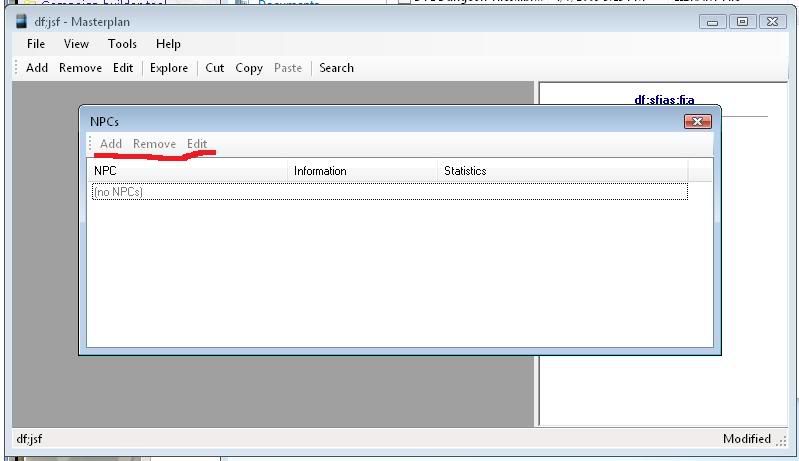
I have found one bug, and I'm not sure if you're already aware of it, but the Overview tab in the Player Characters window throws an exception and crashes the entire program if you don't have any player characters in the details tab.
I just found this thread, and have been playing with MasterPlan all day - it's an incredibly indepth tool, and I have to say I love it already.
I have found one bug, and I'm not sure if you're already aware of it, but the Overview tab in the Player Characters window throws an exception and crashes the entire program if you don't have any player characters in the details tab.
I will fix that immediately. I'll upload a new version by the end of the day.
Is it possible to export monsters into a spreadsheet format or some such?
Not currently, but in the next version there will be a way to export creatures (and traps and skill challenges etc) to HTML, which you could then import into a spreadsheet or word processor.
Part of me is wondering whether you've already considered that, while the rest wants to thank you for such a great tool.
ETA: Never mind, we figured it out. The extension works fine, it's just that the example, pull files 1-10, doesn't work because 1-10 are blank files.
This looks like a great program... I've read through a lot of the comments and it seems all the Dungeon Tile links are dead links. can anyone send me the tiles to work with this program? i know this issue has already been brought up multiple times but any help would rock.. thanks.. and awesome work on this program
The dungeon_tiles Yahoo group seems to be the place to go.
The dungeon_tiles Yahoo group seems to be the place to go.
thanks bud...
For PCs, adding conditions and applying damage is greyed out. Is that normal behavior or am I doing something wrong? Tracking conditions has never been our strong side, so it'd be nice from time to time.
On the same token, could there be a warning displayed when you start the turn of a creature that is stunned, dazed or suffering from another condition that affects the number of actions to take? It got late yesterday and I had already rolled the attack of a creature that I then realized was stunned.
One question regarding maps. I set one up using Dungeon Tiles, only to find that I had no way to tell the program which tiles grant cover (statues and the likes). We sometimes use a different tile system with cardboard-made walls (which are a square wide), so I'm wondering whether there's a way to tell the mapper to consider some tiles blocking. The same would probably apply to squares that provide cover and block line of sight as effect of a power (I notioced the overlay-function, and I loved it.).
Oh, and again thanks for making such a highly versatile tool and sharing it with the rest of us.
Can this program facilitate remote gaming in and of itself (ala Fantasy Grounds or MapTool), or is it just a cool way to plan campaigns?
Not by itself (yet) but an easy way to do this is to use Masterplan's player view screen with some sort of application sharing program (Messenger, Skype etc).
For PCs, adding conditions and applying damage is greyed out. Is that normal behavior or am I doing something wrong? Tracking conditions has never been our strong side, so it'd be nice from time to time.
This is as designed. Due to the complexity of modelling PCs, Masterplan assumes that players are capable of tracking their own characters' hit points and so on.
On the same token, could there be a warning displayed when you start the turn of a creature that is stunned, dazed or suffering from another condition that affects the number of actions to take? It got late yesterday and I had already rolled the attack of a creature that I then realized was stunned.
I'll put that on the list.
One question regarding maps. I set one up using Dungeon Tiles, only to find that I had no way to tell the program which tiles grant cover (statues and the likes). We sometimes use a different tile system with cardboard-made walls (which are a square wide), so I'm wondering whether there's a way to tell the mapper to consider some tiles blocking. The same would probably apply to squares that provide cover and block line of sight as effect of a power (I notioced the overlay-function, and I loved it.).
This isn't in the current version, but it's coming.
This isn't in the current version, but it's coming.
Very much looking forward to it, thanks
.Can this program facilitate remote gaming in and of itself (ala Fantasy Grounds or MapTool), or is it just a cool way to plan campaigns?
Yes you can use it to do gaming.
But
To make it work well, imo, you need a second monitor and then something like TightVNC, which is free, a remote viewer. That's what I do in my weekly game and it works GREAT! Further, multiple people can connect to it, so you can have more than one site see it.
turlough
To make it work well, imo, you need a second monitor and then something like TightVNC, which is free, a remote viewer. That's what I do in my weekly game and it works GREAT! Further, multiple people can connect to it, so you can have more than one site see it.
I havn't used the PlayerView yet, but that sounds like a great solution for a problem my group has been facing, and using a webcam to cover the map never really cut it.
Another question, unrelated: do you have the possibility to run skill challenges with the tool, or at least have the apropriate DCs displayed in list view and not only when editing it? Even better would be a way to tick off certain rolls and get the additions to other chesks automatically added. And what about a combination of skill challenges and combat encounters? Or multiple challenges in parallel, as per the recent RSC article... Or... yes, shutting up now.
One last thing, the possibility to arrange plotpoints vertically, i.e. form different rows despite links.
Another question, unrelated: do you have the possibility to run skill challenges with the tool, or at least have the apropriate DCs displayed in list view and not only when editing it? Even better would be a way to tick off certain rolls and get the additions to other chesks automatically added. And what about a combination of skill challenges and combat encounters? Or multiple challenges in parallel, as per the recent RSC article... Or... yes, shutting up now.
You can add skill challenges to encounters, yes.
The rest is in the works.
I'm trying to put master plan on my laptop, I downloaded 6.7 off the website, got the DT1 library and uploaded my monster manual library, but when I try to make a map it says I have no libraries available, and when I check libraries its not registering either of them.
Make sure the libraries are in the same folder as Masterplan. The next time you run it, it should pick them up.
They're in the same folder, but libraries says no libraries are installed.
Even after restarting Masterplan?
Since the forums are being taken offline, might be best to take this to the Facebook page.
Well found the probable cause, I just wiped this laptop, and I left windows update running, but now that I've checked it out it appear the computer freezes when running windows update (old, crappy laptop) so I don't have .net 3.5 installed.
I'm amazed it runs at all without .NET installed.
Hi, First off I want to say that I love this app and I recently got a few other members of my group hooked as well. Anyway I have a request, is there anyway to change the creature tokens on the combat encounters?
Hi, First off I want to say that I love this app and I recently got a few other members of my group hooked as well. Anyway I have a request, is there anyway to change the creature tokens on the combat encounters?
Not currently, but it'll be available soon.
You sir are some sort of sorcerer.
Me too, really looking forward to being able to set custom tokes for creatures and players.. my players are not impressed with the current setup.. so would really like to see that as soon as possible...
cheers, thanks for a great tool.
Me too, really looking forward to being able to set custom tokes for creatures and players.. my players are not impressed with the current setup.. so would really like to see that as soon as possible...
cheers, thanks for a great tool.
Version 6.9 is now available for download, and includes the ability to set custom images for creature tokens.
Will the wonders ever end? Seriously, this tool has become a must have for my group and I give a silent thanks to you everytime we use it.
Will the wonders ever end? Seriously, this tool has become a must have for my group and I give a silent thanks to you everytime we use it.
Glad you like it; the most useful thing you (and anyone else) can do in return is to publicise it everywhere you can!
I am really impressed with this. I downloaded it for the tile mapping, but the other features look good too. Over the last two days I have designed three encounters nd a skill challenge.
A few points:
When my son ties to run it from his account, it crashes straightaway. This is on WinXPHome. Do you have to be an administrator?
A useful feature on the tile mapper would be if you could click ctrl-d to duplicate the currently selected tile. Also, it would be good if you could save while still working on the map.
For skill challenges, options for automatic successes and automatic failures (eg, if you try to intimidate the lord, automatic failure). Also, some way to show that succes or failure at one stage allows a new skill check (eg, you need to succeed with perception to find someone, and then you get new opportinities to talk to him).
The ability to import monsters from the Monster Builder (which now allows XML exports) would also be neat.
For skill challenges, options for automatic successes and automatic failures (eg, if you try to intimidate the lord, automatic failure). Also, some way to show that succes or failure at one stage allows a new skill check (eg, you need to succeed with perception to find someone, and then you get new opportinities to talk to him).
This can be stated in the details or you can not fill in the success field and only fill in the failure field. My suggestion about this part is to do away with the tabs and stack the fields, this would make copying and pasting into it easier. I often type what I am wanting into a word processor and then go from there (helps with spell checking and such). It is not so bad to have to copy all the text into the details and then move bit by bit but if the fields were all visable at once it would be easier.
The ability to import monsters from the Monster Builder (which now allows XML exports) would also be neat.
If you download the compendium addin that is available on the site you can import saved HTML pages. After finishing your custom monster just save the page as a HTML only file and then from within Masterplan go to Tools -> Addins -> Compendium -> add File. Select the file you saved and there is your custom monster.
My only issue with the import is that when you go to the "powers" section of the monster in the library the attack bonus and defense is not auto filled, it is put into the details of the power but you have to manually put it into the field above. However I understand how touchy this could be to code so I am not that worried about it since the end result is the same output.
I do have one other thing I would like to suggest. I am not sure if I am just missing it or what but when I go and start creating encounters I don't have a way to filter the list to only show creatures within a certain level range. Say I am making a easy encounter for a level 5 group, I may only want to show level 3-5 monsters. This is not possible. Also a preview pane for the monster would be nice. Something that would show the stat block of the selected monster. Lastly (and this is due to working on a laptop touchpad which is not as easy to click and drag as it is with a mouse) a button to add the monster would be nice.
The new version doesn't use the Compendium add-in; Compendium and Adventure Tools access is now built-in.
When my son ties to run it from his account, it crashes straightaway. This is on WinXPHome. Do you have to be an administrator?
I solved this. The issue was with file permissions. As long as the user has full control to all files in the directory it is okay.
The ability to import monsters from the Monster Builder (which now allows XML exports) would also be neat.
I downloaded version 6.10 now, which will download all the monsters from the compendium. Which makes Wizards' Monster Builder superfluous.
Any chance of adding a feature to download traps too?
Yeah, I'm working on that now. It'll be in the next version.
Except those of us that are non windows...
If there's enough interest, I can certainly try to build a version for other platforms.
I realize this is an old post, but having just discovered your wonderful application last night, I'm wondering if a Mac port is in your plans at all. I run Windows on my iMac using VM software (mostly for the Character Builder), but it eats up a lot of resources and is a bit slow. A Mac port of Masterplan would be absolutely fantastic.
I have only tinkered around with the program so far, but I'm blown away. Great job!
It would save me running virtual software or VNCing into my main computer, and would run a lot faster.
I tried running it with mono on mac however it throws up errors:
"libgluezilla not found. To have webbrowser support, you need libgluezilla installed"
It seems the site is no more. Anyone have any info on what happened to it?
Which site? www.habitualindolence.net/masterplan should still be up.
The new version doesn't use the Compendium add-in; Compendium and Adventure Tools access is now built-in.
I've recently downloaded the latest version and trying to get the hang of it. I've been able to import Monsters I exported in XML fine, but I'm not finding the Compendium support anywhere, is it still there? It isn't mentioned in the help file.
Also it would be nice if the maps (and images) could be zoomed in and out, and dragged within the window.
read the blog/notices on the Masterplan site. Also you could make the suggestion on the Materplan Facebook page
Which leads me to my question: Why are there no .masterplan-files for download? I've googled and such and found nothing. Does anyone have a masterplan they'd be willing to share, or do you know where one can get them?
Thanks.