| Post/Author/DateTime | Post |
|---|
| #1pallin_rahlJun 04, 2009 17:32:22 | I've seen, over time, some impressive homebrew world maps here and there online (posted in forums or whatever)... but I personally just stink at making world maps for my homebrew games. Normally I just snag one I see somewhere and modify to suit the needs of the game at hand. Sadly, my photoshop-fu is weak for creating nice-looking, unique maps.
Anyone know any good world-map creating programs out there ("free" is a must). 
Any tips for photoshopping it?
Hell, post your homebrew world maps that you wouldn't mind others use ;)
Thanks in advance! |
| #2rcorporonJun 06, 2009 18:51:21 | I used this:
http://www.snapfiles.com/get/gfreliefmap.html
To generate a map, and then gave it to one of my buddies who's a graphic designer to make it really awesome.
That little program is quite powerful, and will also allow you to put custom city names in. |
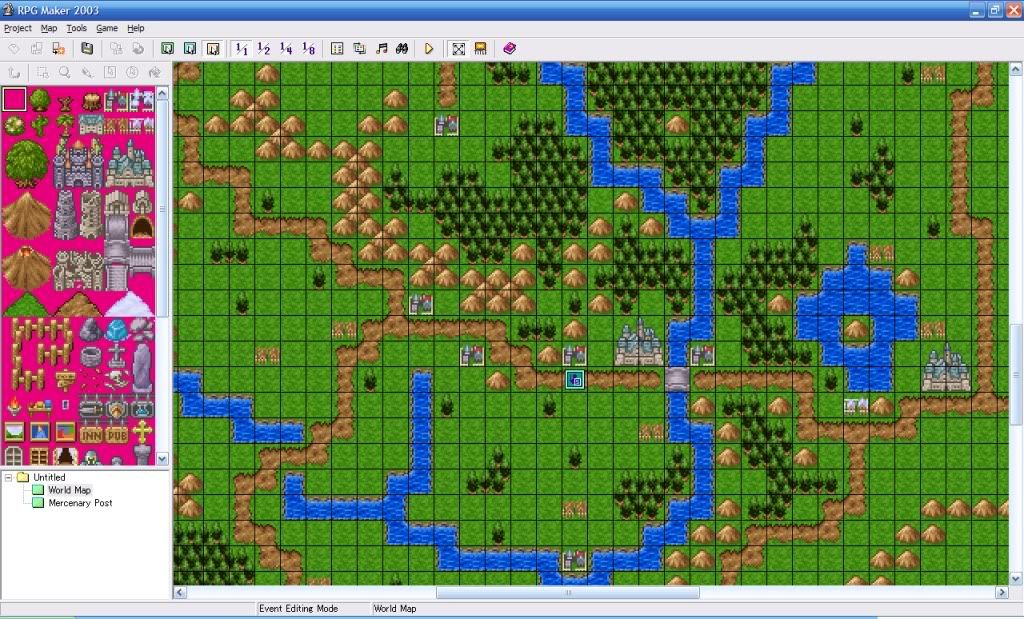
| #3DragonsWrathJun 06, 2009 21:38:56 | I've been making one in something called RPG Maker 2003. Google it.
Free online, but you may have to join a membership site (also free) to download it. Just give them your spammail account.
The map-making aspect is about as stupid-easy as you can get, though it doesn't actually have a way to print the map as far as I know. I mostly use it for reference, and I've shown my players the map once or twice.
Screenshot + paint to print part of it if you really need to. I may make a little program that compiles a big screenshot of a particular map if I get bored &/or have time.
|
| #4rcorporonJun 07, 2009 22:22:32 | Those look like maps used for that old RPG "Dragon Warrior" on the NES !! |
| #5AbdulAlhazredJun 08, 2009 12:00:17 | Draw it on paper and scan it. I'd draw it on plain unlined paper though. That way you can pull it into photoshop or whatever and overlay a hex or square grid if you need to, add lettering, etc. But the hard part you can do with paper and pencil, which is way easier and faster. |
| #6PhantymwolfJun 08, 2009 15:30:48 | I know that free is a requirement for you, but seriously consider dropping some money down eventually and pick up the latest Campaign Cartographer. The program is pure awesome filled with creamy win-sauce for making world maps for D&D. I used the 2nd edition of the program for my 3.5 maps, and used the recent 3rd iteration for updating my maps to 4th edition. |
| #7dungeonmastergazJun 09, 2009 8:55:31 | There's some fantastic maps over at the Cartographer's Guild, along with tutorials and advice on all different kinds of software used to make the maps. Check it out.
DMG |